Cypherock X1 Review: Is This Distributed Security Better Than Ledger?
Imagine losing access to your life savings because of a misplaced piece of paper.
For many crypto investors, the 24-word seed phrase backup is a constant source of anxiety. It can be stolen, copied, destroyed in a fire, or simply forgotten.
Hardware wallets like Ledger or Trezor provide security for the device, but they still rely on that vulnerable seed phrase on paper.
Enter the Cypherock X1 – a hardware wallet that aims to eliminate the single point of failure inherent in seed phrases. Instead of putting all your trust in one secret, the X1 introduces a seedless model using multiple hardware components and cryptography to keep your keys safe.
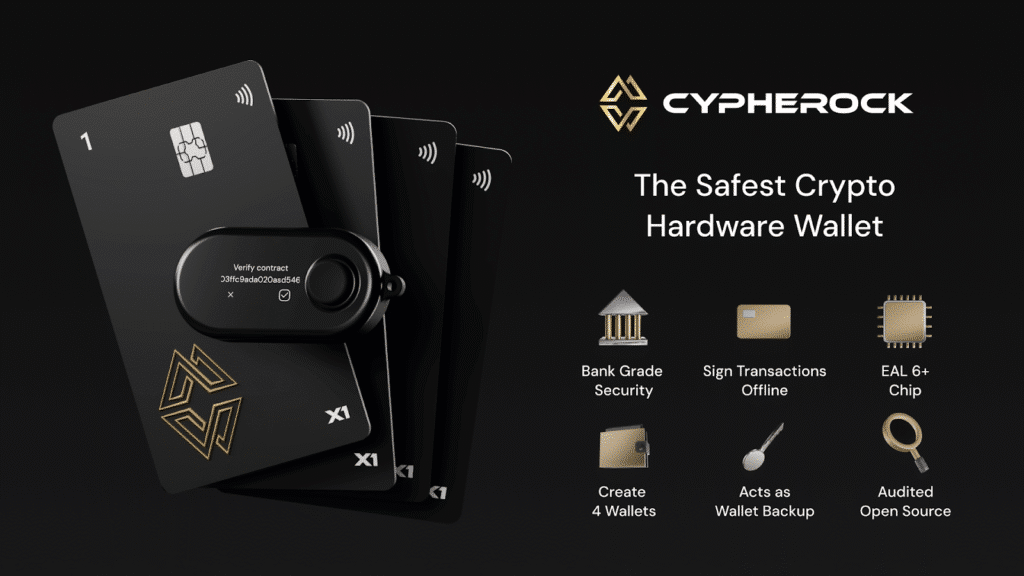
In this comprehensive guide and review, we’ll explore how the Cypherock X1 works and why it’s a meaningful evolution in cold storage. We’ll break down its innovative use of Shamir’s Secret Sharing (splitting your key into parts), the security architecture (EAL6+ secure elements, open-source firmware, attack mitigations), and the real-world benefits like no seed phrase theft, resilience against device failure, and even crypto inheritance planning.
If you’ve ever worried about losing a seed phrase or a hardware wallet malfunctioning, read on – this seedless solution might put those fears to rest.
Quick Verdict: Is the Cypherock X1 Worth It?
If you are tired of the “paper seed phrase anxiety,” the Cypherock X1 is the most innovative solution on the market. It offers bank-grade security without the single point of failure.
- Security: EAL6+ Smart Cards (Seedless)
- Ease of Use: High (No paper backup needed)
- Best For: Long-term HODLers & Inheritance planning
Deal Alert: You can Grab the Cypherock X1 here with our referral link to save up to 17% off your order today.
How the Cypherock X1 Works: Vault, Cards, and Seedless Security
The Cypherock X1 hardware wallet doesn’t use a written seed phrase at all during normal operation.
Instead, it decentralizes your secret across five physical devices using cryptography. The kit consists of one X1 Vault (a handheld hardware wallet with a screen and buttons) and four X1 Cards (credit-card sized smart cards).
When you create or import a wallet on the X1, it splits your 24-word seed phrase into 5 cryptographic parts using Shamir’s Secret Sharing (SSS). Each part is stored on a separate tamper-proof device – the Vault holds one shard (in its secure chip) and each of the 4 Cards holds another shard. Crucially, you need any 2 of these 5 parts to recover the full key (a 2-of-5 threshold scheme).
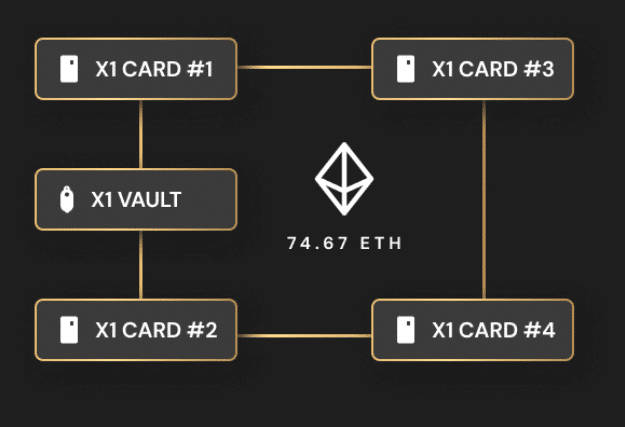
The Cypherock X1 splits a 24-word seed phrase into 5 parts (Source: Cypherock)
In practice, that means the X1 Vault plus one X1 Card is sufficient to sign transactions or restore your wallet.
If your Vault device is unavailable, any two X1 Cards together can rebuild the seed on a new Vault.
Lose a card? Not a problem – five parts protect your crypto, but only two are required to recover it. You could misplace up to three of the cards and still access your funds with the remaining two parts. This dramatically reduces the risk of total loss compared to a single paper backup.
Shamir’s Secret Sharing (Explained Simply)
To understand why this is so powerful, imagine you have a secret too important to trust with one person. You split the secret into pieces and give each piece to a different person. No single individual knows the whole secret, but when enough of them come together, they can reconstruct it.
That’s the basic idea of Shamir’s Secret Sharing. In Cypherock’s case, your 256-bit master private key (seed) gets broken into 5 pieces. Each piece by itself is useless – it looks random and can’t unlock your wallet. But if you have the required threshold (2 pieces, in this default scheme), the device can mathematically recombine them to reveal your key.
The X1 implements that behind the scenes so that the user never sees the full seed phrase unless they explicitly choose to view it. The private key is reconstructed only temporarily, in the Vault’s secure memory when you need to sign a transaction, then immediately deleted from memory after use.
The rest of the time, the key exists only in divided form across the five pieces. This “seedless†approach means you don’t have to write down a recovery phrase or worry about someone finding it – the backup lives in those smart cards that you control.
This mathematical redundancy means your ‘backup’ is virtually indestructible. If you’re ready to move away from vulnerable paper backups, you can get your 17% discount here and secure your stack with the X1.
The X1 Vault and X1 Cards in Action
The X1 Vault is the main hardware wallet device – it has a small screen and a 5-way joystick for navigation. You connect it to your computer (via USB) and use the Cypherock cySync app to manage your wallets and assets.
The X1 Cards are essentially secure key storage devices (with NFC), similar to the chip in your credit card. During setup, you tap each card to the Vault to initialize it, and the Vault writes an encrypted shard of your seed onto each card.
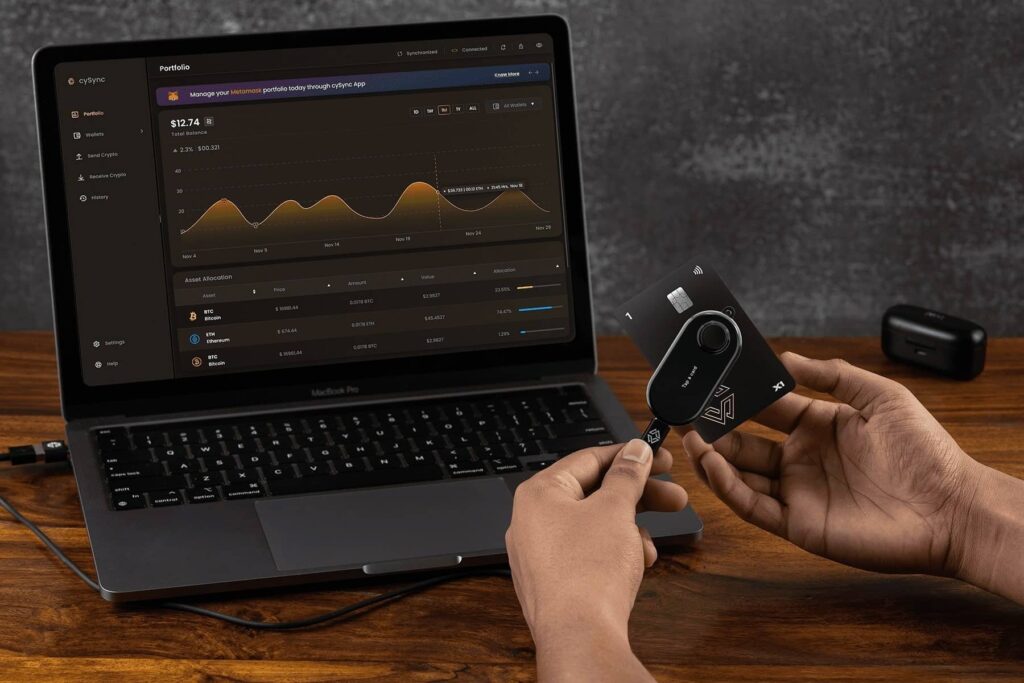
Cypherock X1 in action (Source: Cypherock)
To approve a transaction, you will insert or tap one of the Cards to the Vault (the Vault has an NFC reader). The Vault pulls the shard from the Card and combines it with its own shard (or with another card’s shard) to reconstruct the full private key internally and sign the transaction. After signing, the key is wiped from the Vault’s memory. Because of the threshold design, a thief would need at least two of your devices at the same time (say, the Vault and a Card, or two Cards) and your PIN in order to steal your crypto. With only one part, they get nothing. With two parts but no PIN, they also get nothing (more on PIN protection shortly).
Bottom line: Cypherock X1 decentralizes your seed into multiple pieces, removing the single point of failure common to traditional wallets.
You never have to transcribe or hide a recovery phrase on paper; your “backup†is automatically taken care of by the Shamir shards on the cards. This makes the nightmare scenario of seed phrase theft or loss virtually a thing of the past. Even if one card is lost or one device is compromised, your funds remain safe and recoverable with the others.
Security Architecture: Inside the X1’s Robust Protection
Security is the core of Cypherock’s design, and it goes far beyond splitting the seed.
The X1 combines high-security hardware components with open-source transparency and thoughtful attack mitigations.
Here’s an overview of why it’s considered extremely secure:
Secure Elements (EAL6+)
Each of the X1 Cards contains a secure element chip rated EAL6+, the kind of tamper-resistant hardware used in electronic passports and banking systems. These chips are designed to thwart physical hacking attempts (like voltage glitching or fault injection) that could extract the data.
The X1 Vault itself uses a Microchip ATECC608A secure element alongside its STM32L4 microcontroller. During wallet creation, the Vault even uses both the MCU and secure element to generate randomness (entropy) and XORs them together – ensuring that even if one random number generator was compromised, the result is still unpredictable. This attention to eliminating single points of failure (even in random number generation) exemplifies the X1’s security philosophy.
Open-Source Firmware (Auditable)
Uniquely, Cypherock managed to create a hardware wallet that is open-source while still using secure elements.
The firmware code for the X1 Vault (the main device) is open for anyone to review and has reproducible builds. This means the community can independently verify that the device is running the code it claims to (an important defense against hidden backdoors).
How is this possible, given most secure-element-based wallets are closed-source? Cypherock’s trick is that the Vault’s code is open, but the Cards’ code can remain closed (the card secure elements do require NDA-protected code).
Since the private key shards are split among five pieces, having the Vault open-source does not expose your full key. Meanwhile, the card firmware is not user-upgradeable, reducing the risk of supply chain attacks or unauthorized modifications. This hybrid model gives users the best of both worlds: verifiability of operations on the Vault, and ultra-secure storage of key parts on the cards.
Independent Security Audit
The Cypherock X1 has been third-party audited by Keylabs, a renowned security firm known for finding vulnerabilities in other wallets (they famously co-ran the Wallet.Fail project targeting Ledger, Trezor, etc.).
The Keylabs auditors noted that “the Cypherock X1 is an innovative wallet that uses many hardware and software security best practices and even features several security firsts that we have not yet seen in other walletsâ€.
The X1 passed the audit, and the team implemented all recommended fixes, which are documented on Cypherock’s site. An active bug bounty program is also in place to incentivize ongoing scrutiny. This should give users additional peace of mind that the product’s security claims aren’t just marketing – they’ve been vetted by experts.
PIN and Encryption
When you set up a wallet on the X1, you’ll assign a PIN (and you can even opt to add a BIP39 passphrase for an extra hidden wallet if desired).
The PIN isn’t just for unlocking the device; it’s also used to encrypt the shards stored on each X1 Card. So even if an attacker somehow got hold of two of your cards, they would still need to know your PIN to decrypt the shares and use them.
The X1 Vault enforces PIN attempt limits with an exponential backoff (increasing delay) to make brute-forcing impractical. In short, no one can use the pieces of your key without both physical possession and your secret PIN. (Just be sure not to forget your PIN – more on that in the FAQ.)
Attack Mitigations
Cypherock anticipated a wide range of attack scenarios:
- Remote hacks (malware/phishing): Because the X1 is seedless by design, you are never asked to input or expose your 24-word seed on a computer. This eliminates the most common attack on wallets: tricking users into typing their seed into a fake app or website. Even firmware updates are less risky – the X1’s private keys are never stored on any single upgradable component, and the Vault holds only 1 of 5 shards, so a compromised firmware alone couldn’t steal your whole key. The firmware is also open-source and deterministically built, meaning the community (like Wallet Scrutiny) can verify updates.
- Supply chain tampering: Each X1 Vault and Card has an authenticity check during initialization. The devices authenticate with Cypherock’s server to confirm they’re genuine and untampered, and the cySync app will alert you if something is off. For extra assurance, Cypherock sends an email 2FA confirmation of your device’s authenticity when you activate it, so even a compromised PC app can’t lie about the result.
- Physical theft: The hardware is designed so that no single piece can give up the keys. If a thief steals your X1 Vault alone or a single Card, it’s useless to them without at least one other part. Even if they snatch the Vault and one Card, they still hit the PIN encryption barrier on that second part. The Vault device itself is built to resist physical tampering – it’s sealed with ultrasonic welding, so any attempt to pry it open will likely damage it and be evident. Internally, the secure element protects the shard stored on the Vault from extraction.
- $5 wrench attack (coercion): If a criminal tries to violently force you to give up your keys, Cypherock’s scheme can delay or deter them. Since your X1 Cards can be stored in multiple locations, an attacker can’t get all parts quickly from you. You might keep one card at home, one in a bank deposit box, one with a trusted relative, etc. – so an attacker would have to kidnap you and take you to each site, greatly increasing their risk. The X1 also lets you create up to 4 separate wallets; you could maintain a small “decoy†wallet without a PIN, surrender that if forced, while your main funds remain in a PIN-protected wallet that the attacker cannot access. And if you’re really concerned, you can add a passphrase to create a hidden wallet that only you know exists.
- Device failure or company failure: Even in the extreme scenario that Cypherock (the company) disappears, you won’t lose access to your crypto. The X1 allows you to retrieve the full 24-word seed from your devices without any proprietary software – for example, by using the Vault and one card offline (powered by a battery pack) to display the seed phrase on-screen. The product is BIP39-compliant, meaning you can then input that seed into any standard wallet. And if your Vault dies but you still have cards, Cypherock has promised an open-source mobile app that will let you tap any 2 cards to recover the seed on your phone. We’ll cover the recovery procedures more in the FAQ, but the key point is you’re never locked in or dependent on Cypherock’s continued operation.
In summary, the Cypherock X1’s security stack is layered and robust: high-assurance hardware elements, no single-point sensitive data, user-controlled PIN encryption, verifiable firmware, and real-world attack considerations.
It’s not just theory either – it’s been tested by professionals. For many security-conscious investors, this architecture is a dream come true: your crypto is protected not only from remote hackers and malware, but also from physical theft, mistakes, and even the unpredictability of life.
Top 5 Benefits of the Cypherock X1
Why go “seedless†with Cypherock?
Below are the five biggest advantages of the X1 model, especially for intermediate to advanced HODLers.
Decentralized Recovery & Redundancy
Your private keys are backed up across multiple devices that you distribute, not on a single piece of paper in one location. This means you can geographically separate the parts – for example, keep two cards at home (in different rooms), one in a bank vault, one with a family member, etc..
A fire, burglary, or natural disaster in one place won’t wipe out your backup. Even if you lose up to 3 of the 5 parts, you can still recover your funds with the remaining two. This built-in redundancy greatly reduces the risk of catastrophic loss due to human error or unforeseen events.
No Single Point of Failure (Better Security)
Unlike traditional wallets where a single leaked seed phrase means total compromise, Cypherock ensures no single component can breach your security.
There is no all-powerful seed phrase lying around to be found. An attacker would need to obtain multiple pieces of your X1 (and your PIN) to even have a chance. You also avoid trusting any one manufacturer or device – the cryptographic threshold means the failure of one element doesn’t expose your keys. This eliminates the classic “one slip-up and it’s over†problem of seed phrases.
Even the randomness that creates your key is split between two chips to avoid any single point of failure in key generation. It’s a holistic security upgrade from the ground up.
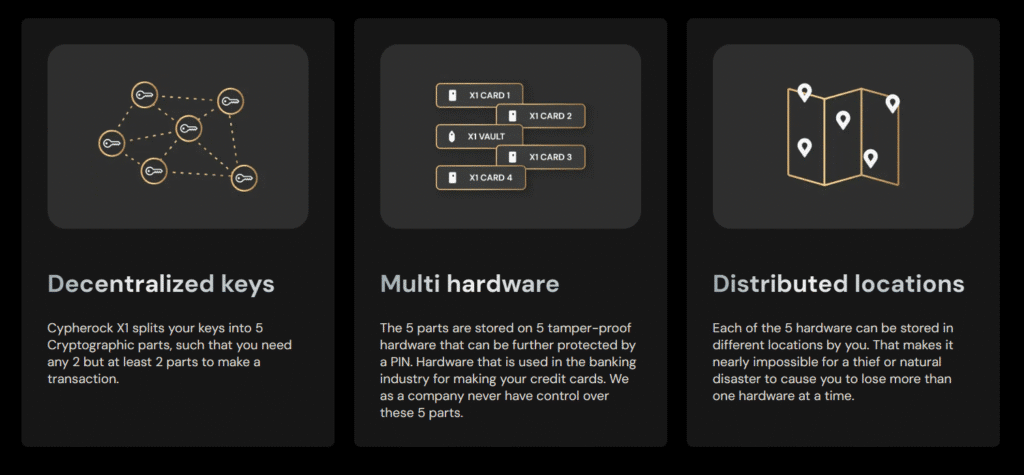
How Cypherock X1 protects users (Source: Cypherock)
Ease of Use – No Paper, No Hasse
Despite the complex technology under the hood, the X1 is designed to be user-friendly.
The setup is guided by a wizard in the cySync app that clearly explains each step. You don’t need to painstakingly write down 24 words or worry about hiding a backup; the device automatically takes care of it by writing to the cards.
Daily use of the X1 is also straightforward – the menus on the Vault are simple, and the cySync software provides a modern interface for managing accounts.
Inheritance Planning (Trustless Estate Transfer)
One of the standout benefits of Cypherock’s approach is how naturally it supports crypto inheritance.
Because you can distribute the X1 Cards to different trusted individuals, you’re able to set up a scheme where your heirs can combine parts to recover funds – without any one person ever having the whole key alone.
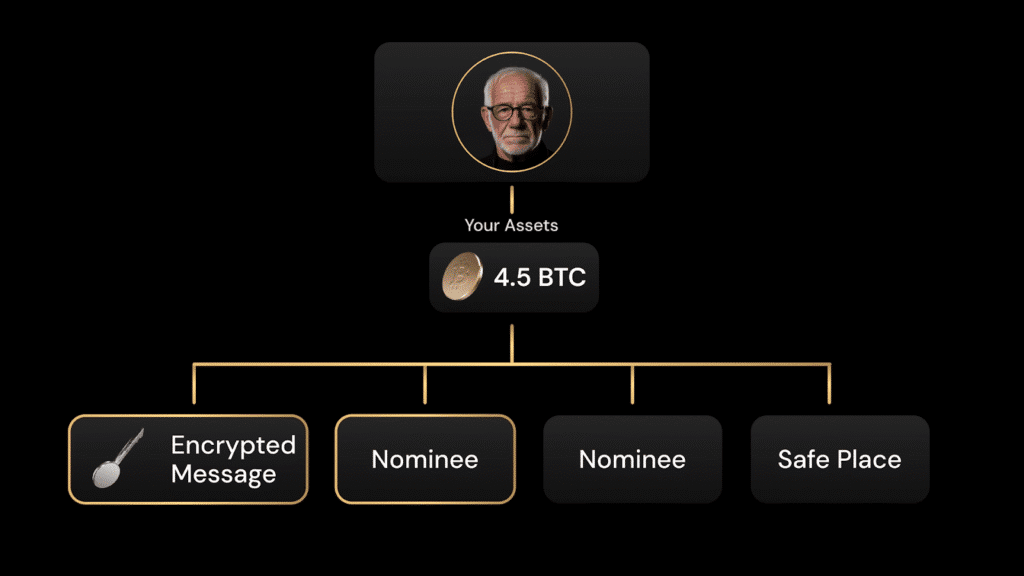
Cypherock comes with support for crypto inheritance (Source: Cypherock)
Cypherock is rolling out a dedicated service called Cypherock Cover for that purpose: a non-custodial, no-KYC solution to ensure your loved ones can retrieve your assets if something happens to you.
For example, you might give Card 3 to a spouse and Card 4 to an executor or lawyer, each protected by PIN.
Only if something happens to you would two Cards be used together to unlock the funds, avoiding single points of failure in nominee selection. This is far more secure than sharing a seed phrase or splitting a paper backup among family (methods which are either insecure or hard to execute).
With X1, inheritance planning is essentially built in – it’s “trustless†and automated by cryptography, which is a game-changer for family offices and long-term HODLers thinking about estate planning.
Don’t leave your family’s future to a lost piece of paper. You can set up your trustless estate plan today and save 17% on the Cypherock X1 kit using this link.
Multi-Wallet Support & Portfolio Management
The Cypherock X1 can serve as a universal backup for multiple wallets.
It supports up to 4 independent wallets/seeds on one device – each with its own seed phrase and PIN if desired. This means you could secure, say, your Bitcoin wallet, your Ethereum wallet, and two other altcoin wallets all with the same X1 set. It’s like having four hardware wallets in one, each backed up by the cards.
The cySync companion app lets you view and manage all these wallets and their assets in one place, providing a unified portfolio dashboard across different blockchains. This is ideal for investors who hold multiple cryptocurrencies; instead of juggling several hardware devices or seed phrase backups, you consolidate them under the X1’s protected system.
Additionally, since Cypherock’s security model works for any BIP39 wallet, you can even import existing wallets (from MetaMask, Ledger, etc.) into the X1 as backups. This makes migrating to Cypherock or using it as a backup vault for other devices quite seamless.
And because the X1’s signing is single-signature (just split-key), you don’t face the higher network fees that come with on-chain multisig wallets.
In summary, the X1 not only boosts security but also offers a convenient way to organize and safeguard multiple crypto accounts at once.
Cypherock X1 vs. Legacy Seed Phrase Wallets (Ledger & Trezor)
How does the Cypherock X1’s decentralized model stack up against popular hardware wallets that use the traditional seed phrase backup? The comparison below highlights key differences:
| Feature | Cypherock X1 (Seedless) | Ledger Nano X (Traditional) | Trezor Model T (Traditional) |
| Seed Backup Method | Shamir Secret Sharing (2-of-5) on 5 separate hardware devices – no paper seed phrase. | 24-word recovery phrase on paper or metal (single backup). | 24-word recovery phrase on paper or metal (supports SLIP-39 Shamir as an optional feature). |
| Single Point of Failure | None: Requires at least 2 parts to reconstruct keys, so one lost/stolen part doesn’t compromise funds. | Yes: Seed phrase is a single point of failure (if it’s lost or stolen, funds are at risk). | Yes: Seed phrase is a single point of failure by default (Shamir backup can mitigate this if used, but it’s not default). |
| Open Source | Partially: X1 Vault firmware is open-source and reproducible; X1 Cards’ secure element code is closed (for security). Overall operations can be audited by the community. | No: Firmware is closed-source (secure element code proprietary); only the Ledger Live app is open-source. Relies on security through obscurity and vendor trust. | Yes: Fully open-source firmware and hardware schematics. Uses general-purpose secure chips without NDAs, so anyone can inspect code – but no certified secure element on board. |
| Secure Element | Yes: Uses secure elements in all components – EAL6+ rated chips in cards, and a secure chip (ATECC608A) in Vault. High resistance to physical attacks. | Yes: Uses a dedicated secure element chip (Ledger’s SE is CC EAL5+ certified), which protects keys but its design is closed source. | No: Does not use a secure element (stores keys in MCU flash memory). Relies on passphrase/encryption for physical security; easier to extract if attacker has the device. |
| Multi-Device Backup | Yes: Comes with 1 Vault + 4 Cards included (~5 devices) working together. Redundant backups, no extra steps needed. | No: Comes with 1 device. User must create and protect their own paper/metal backup. (Some add-ons like Ledger Recover offer cloud backup at extra cost, with custody trade-offs.) | No: Comes with 1 device. User maintains the paper backup (Model T does offer an optional Shamir backup, but you must generate and manage multiple shares manually). |
| Price (USD) | ~$200 (typically includes the whole kit of 1 Vault + 4 Cards). Often discounted around $150–$180. | ~$149 for Ledger Nano X (plus the intangible cost of setting up secure backups). Ledger Stax ~$279. | ~$219 for Trezor Model T. (Trezor One is ~$80 but lacks Shamir support and touch screen). |
Current Best Price: The X1 offers the best “per-device” value when you consider it includes 4 cards. Check current pricing (and apply a 17% discount).
Key Takeaways
The Cypherock X1 is fundamentally different in that your backup is distributed across hardware rather than on paper. This eliminates several failure modes that Ledger and Trezor are still exposed to (namely, the paper seed being a single point of attack or loss).
On the other hand, traditional wallets are simpler (one device, one phrase) and have been around longer, so their ecosystems (third-party integrations, etc.) are more mature. The X1’s unique architecture comes at a slightly higher cost and a multi-piece setup, but for those prioritizing maximum security and resilience, it provides a level of protection that single-device wallets can’t match.
The table also shows trade-offs: Trezor is fully open-source but lacks a secure element (making it less secure against physical theft without user precautions), whereas Ledger has secure hardware but closed source (requiring trust in the company). Cypherock’s hybrid approach tries to deliver both security and transparency.
Who Is the Cypherock X1 For?
The Cypherock X1 will appeal to a specific set of crypto users who value security and long-term peace of mind. Here are the main personas who might benefit most from this wallet:
Long-Term HODLers
If you’re planning to hold your crypto for years (or decades), the X1 is built for you. It provides extreme durability for your backup – no more worrying that your seed phrase paper will get lost, water-damaged, or fade over time.
By distributing the cards in secure locations, you ensure that one bad event won’t wipe out your holdings. This is ideal for “set and forget†investors who want to check on their cold storage once in a while and sleep soundly knowing it’s safe.
Your crypto can survive house fires, burglaries, device failures, and even your own forgetfulness (since losing one piece isn’t fatal).
Essentially, the X1 offers HODLers a vault-like assurance that their long-term stash is protected against the unknown.
Security Enthusiasts (Nerds)
Are you the kind of person who reads up on hardware wallet exploits and insists on open-source code? You’ll appreciate Cypherock X1’s design.
It’s a playground of strong security principles: multi-factor key splitting, secure elements, open-source firmware, third-party audits – the works.
Security experts often advocate “no single point of failure†and distrust closed systems; the X1’s architecture implements those ideals in a novel way.
If you’re already considering multisig or using multiple hardware wallets to secure your stash, the X1 offers a more elegant, unified solution. It’s also a great fit for those who want to experiment and verify – you can review the code, test recovery with various part combinations, and truly control your setup.
In short, it’s for the crypto power user who demands a higher level of assurance than the average.
Family Offices & High-Net-Worth Investors
If you manage significant crypto assets (yours or on behalf of others), the inheritance and redundancy features of Cypherock are very attractive.
Family offices and estate planners will find value in the ability to hand out cards to different trusted parties – no single person can secretly run off with the funds, yet the heirs can retrieve the assets when needed. This removes a huge pain point in cryptocurrency estate planning: how to securely pass on keys without centralized custody.
Additionally, large holders often use multiple wallets to segregate funds; the X1’s multi-wallet support means you can consolidate those backups and manage everything more efficiently. The cost of the device (~$200) is trivial compared to the security it provides for potentially millions in crypto.
For anyone who treats their crypto as generational wealth, Cypherock X1 offers a structured, low-trust way to secure and eventually transfer that wealth. It’s like having a built-in contingency plan for the “what if I get hit by a bus†scenario, which is invaluable for high-value portfolios.
Of course, the Cypherock X1 can be used by anyone, but beginners might find the multi-component concept a bit overwhelming at first. Intermediate users and above – those comfortable with hardware wallets and looking to upgrade their security – will get the most out of what X1 offers.
If you identify with any of the personas above, the X1 was practically designed with you in mind.
Setting Up the Cypherock X1: Step-by-Step Guide
For a wallet with multiple parts, the Cypherock X1 is surprisingly straightforward to set up. You’ll be guided through the process, and it doesn’t require any special technical skills. Here’s how the initial setup works from unboxing to first transaction.
Unbox and Charge the Devices
In the Cypherock X1 package, you’ll find 1 X1 Vault (the hardware wallet device), 4 X1 Cards, a USB cable, and likely some getting-started info.
The Vault comes with a built-in battery; it’s wise to charge it or plug it in with the USB cable during setup. Ensure you have all four Cards handy before you begin (they often come in protective sleeves for safekeeping).
Install the cySync App
Cypherock uses a companion application called cySync to interface with the X1.
Download the cySync app from the official website (available for Windows, Mac, and Linux). Launch the app on your computer.
Now, power on the X1 Vault (hold the power button or use the joystick as instructed) and connect it to your computer via USB. The cySync software will detect the X1 Vault and likely prompt you to initialize or authenticate it. Follow any on-screen instructions to begin the setup.
Pair and Authenticate the X1 Cards
The cySync setup wizard will walk you through pairing your four X1 Cards with the Vault. Typically, the Vault will display a prompt like “Tap card 1†– you then physically tap the first X1 Card to the back of the Vault (it uses NFC).
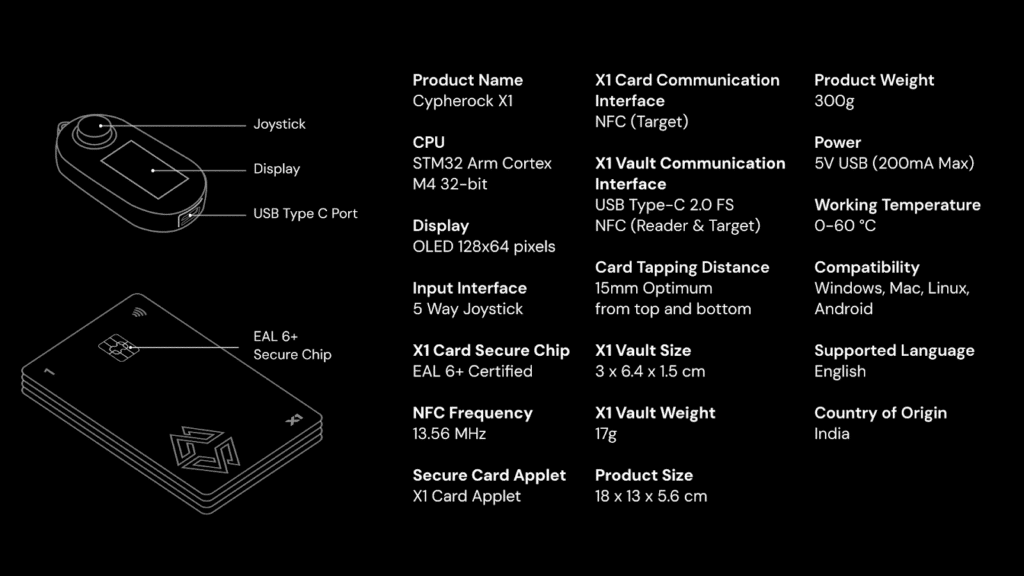
Cypherock X1 technical specifications (Source: Cypherock)
The Vault will register that card and may ask you to name it or confirm it. Repeat this for Card 2, Card 3, and Card 4 as prompted. This process links the cards to your Vault and also performs an authenticity check (the Vault and cards authenticate with each other and with Cypherock’s server to ensure they are genuine devices).
The cySync app will confirm when all cards are successfully initialized. If there is a firmware update available for your Vault or Cards, the wizard will handle that too (make sure to apply any updates it suggests for security fixes and features). Once done, you have an authenticated set of one Vault + four Cards ready to create a wallet.
Create (or Import) a Crypto Wallet
Now it’s time to set up your actual wallet (the crypto accounts/keys you’ll use). On the X1 Vault’s screen, use the joystick to navigate to “Create Wallet†and select it. (If you intend to import an existing seed phrase from another wallet, choose the “Restore from Seedphrase†option – the device will let you input the 12/18/24 words character by character).
For creating a new wallet, the X1 Vault will first ask you to name your wallet (e.g., “My Main Walletâ€). Next, it will prompt you to set a PIN for that wallet. Choose a secure PIN (alphanumeric on the Vault’s interface) that you won’t forget – this PIN will be required whenever you use this wallet and will encrypt the key shards on the cards.
After confirming the PIN, the Vault will generate a brand new 24-word seed phrase internally (using its dual chip RNG mechanism). You won’t see this phrase on screen (the device keeps it hidden unless you choose to reveal it later), but it’s now the root of your new wallet.
If you were restoring a wallet, you’d enter the words at this stage instead, using the Vault’s input method. The device will then verify the phrase with you.
Distribute Key Shares to the Cards
Here comes the Cypherock magic – backing up that seed across the Cards.
Once the new wallet is generated (or imported and verified), the Vault will automatically split the seed into 5 shares using Shamir’s algorithm. The cySync app or the Vault screen will instruct you to tap each of the 4 Cards to the Vault to store the shares.
For example, it may say “Tap Card 1 to back up Wallet†– when you tap it, the Vault writes an encrypted shard of the seed to Card 1. Then “Tap Card 2†and so on through Card 4.
After the last card, the Vault itself retains the 5th share. In this step, you are essentially creating your distributed backup.
The process is quick (a couple of seconds per card tap) and once it’s done, you’ll see a confirmation that the wallet is secured. Each card now contains a piece of the key (locked by your PIN), and the wallet setup is complete.
Important: Make sure you keep all cards safe after this. They are your recovery parts. Cypherock provides sleeves – use them, and consider labeling the cards if you plan to store them separately. (The cards don’t have any markings tying them to your seed; it’s all cryptographic.)
Sync with App and Verify Everything
With the wallet created and backed up, the cySync app will let you add accounts/assets to manage.
At this point, the app might prompt you to “sync†or import the new wallet – do so, and you should see your wallet name appear in cySync, with zero balance to start. You can now add different coins/tokens/NFTs to it (Cypherock supports Bitcoin and more than 19,000 coins and tokens).
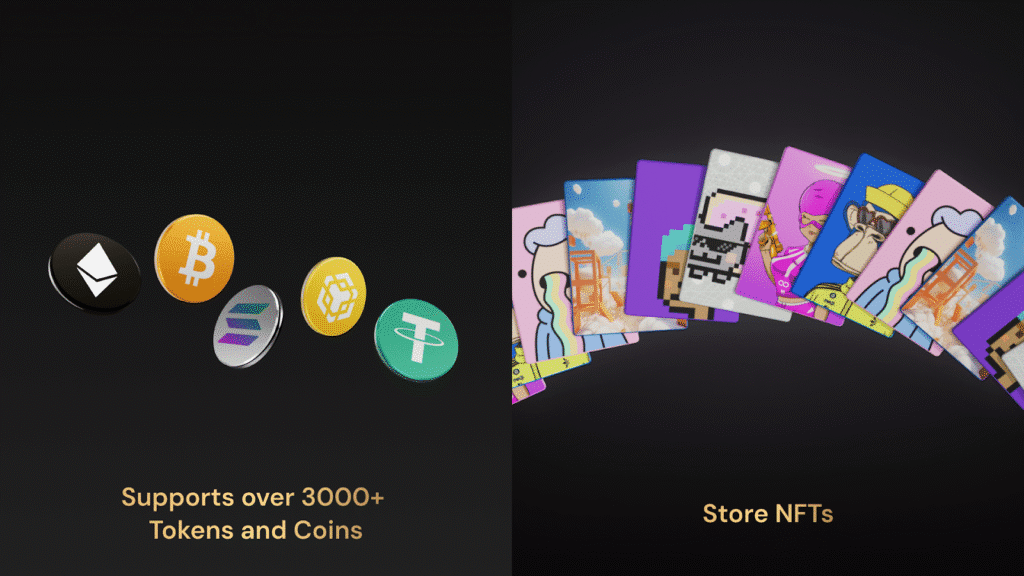
Cypherock X1 supports over 19,000 tokens and coins (Source: Cypherock)
As a final step, it’s wise to verify the setup: for example, receive a small test transaction. Note that to generate a new receiving address for something like Bitcoin, the X1 requires you to have at least one Card present (inserted or tapped), because it needs to reconstruct the necessary part of the key to derive the address. This is a safety measure – it ensures the Vault alone can’t even divulge a new address without a card, thereby never exposing your public keys unless a shard is present. Don’t be caught off guard by this: to receive funds, keep one card handy.
Send a tiny amount of crypto to your new X1 wallet, then try a test spend (you’ll need to approve it on the Vault and tap a card to sign). Once you’ve confirmed everything works, you can confidently destroy any old backup of that seed phrase (if you imported one) or simply enjoy the fact that you never had to write down a new seed at all. Your recovery is already taken care of by the cards. Store the cards in secure locations as planned, and you’re all set!
Using the Cypherock X1 day-to-day, you’ll connect the Vault to your computer or mobile (cySync is available on mobile too) and manage through the app. Just remember: for sending transactions, you’ll always need the Vault + 1 Card in hand to authorize (the app will prompt you when to tap a card).
For receiving, have a card near the Vault to derive addresses. This two-factor physical requirement is what makes the X1 so secure, and before long it becomes second nature (tap card, confirm transaction – done).
Pricing and Value
The Cypherock X1 is a premium hardware wallet system and is priced accordingly.
In the United States, the retail price for the full X1 kit is around $200–$249 USD, which includes the Vault and 4 Cards (and all necessary accessories).
On Cypherock’s official site, it’s often listed around $199 on sale (down from a ~$249 MSRP), and we’ve seen promotional discounts that sometimes bring it into the $150–$180 range.
That price is for the entire set – you do not need to buy anything extra to have a complete seedless backup solution.
By comparison, a single Ledger Nano X is about $149 and a Trezor Model T about $219, not including any secure backup device (those rely on you to buy a steel capsule or use paper). In that context, the X1’s price is reasonable, considering it comes with multiple hardware components.
For U.S. customers, the X1 can be ordered directly from Cypherock’s website and sometimes through authorized resellers (ensure you buy from a trusted source to avoid tampered devices). The package will include the one Vault and four Cards.
No subscription is required for the basic functionality – once you own the hardware, you can use it freely with the cySync app.
Cypherock does offer additional services, like Cypherock Cover for inheritance and PIN recovery, which is a subscription (plans starting around $99/year).
However, Cover is optional; you can certainly use the X1 without any ongoing fees. The Cover service is targeted at those who want a hands-off, automated inheritance solution or an extra safety net for things like forgotten PINs, providing peace of mind beyond the hardware itself.
In terms of value, consider what the ~$200 gets you: a state-of-the-art security setup (five EAL6+ secure elements, custom firmware, etc.), the ability to protect multiple wallets, and potentially saving you from needing to buy multiple different devices or third-party backup tools.
If you’re securing a significant amount of crypto, the cost is a small fraction of your investment and could be well worth it to prevent a costly loss.
Lastly, note that extra X1 Cards or Vaults can be purchased separately if needed (the company sells expansion packs). If you wanted an additional set of cards to rotate in, or a spare Vault device, those are available – but not necessary for most users.
The standard kit suffices for the vast majority of scenarios, from personal use to inheritance planning.
Final Thoughts: Your Security Upgrade
The Cypherock X1 isn’t just another hardware wallet; it’s a fundamental shift in how we think about private keys. By removing the seed phrase, you remove the biggest risk in crypto.
Note: The discount is applied automatically at checkout via the link above.
Frequently Asked Questions
What if I lose an X1 Card or even the X1 Vault? Will I still be able to recover my crypto?
Yes – the system is designed to tolerate loss of components, as long as you don’t lose too many. Your funds remain safe as long as at least 2 of the 5 parts are intact. For example, if you lose one X1 Card, it’s not a problem at all: you still have 1 Vault + 3 Cards, well above the 2-of-5 threshold needed.
You can continue using the wallet normally (though it’s recommended to replace a lost card sooner rather than later; more on that below).
If you lose the X1 Vault device (e.g., it gets damaged or stolen), your funds are also safe – as long as you have at least 2 of the 4 Cards remaining, you can recover. In that case, you would purchase a replacement X1 Vault and use the restore process: the new Vault can be initialized by scanning any 2 of your Cards to rebuild the seed, restoring all your wallets onto the new device. Cypherock’s app makes this straightforward (there are video guides for “lost Vault recoveryâ€). Essentially, two cards alone can act as your backup if the main device is gone.
If you lose multiple Cards: The X1 can tolerate up to 3 card losses (since 2 parts are enough to recover). For instance, if you somehow lost 2 or 3 of your X1 Cards, you should immediately use your Vault + the one remaining Card to access your wallet and view the seed phrase (the Vault has a menu option to reveal the seed with at least one card present). Once you have the seed (write it down in this emergency scenario), you can either import it into a new Cypherock X1 kit or another wallet.
Cypherock advises that if you’re down to only 2 parts left (say, Vault + 1 Card), you should record the seed phrase for safety and then obtain new hardware to re-establish the 5-part setup. This is because with only 2 parts left, you have no further redundancy – you’re at the minimum required shares.
In summary: one lost card is fine, two lost cards is still fine (but urgent to restore), lost Vault is fine (needs new Vault to restore onto). Always ensure you have at least 2 pieces remaining. After any lost component, you should buy a replacement (Cypherock sells packs of additional cards, and you can sync a new card to your existing Vault easily).
Replacing a lost card will involve using your Vault + one remaining card to regenerate the missing shard onto the new card (the cySync app has a procedure for this). It’s worth noting that you must have all 4 cards present to add new wallets on the X1 – so if a card is missing, you won’t be able to create additional wallets until it’s replaced, although you can still use existing wallets with the threshold parts you have.
The bottom line is that redundancy is your friend: the X1’s design gives you breathing room to replace lost pieces without losing any crypto.
What happens if someone steals or finds one of my X1 Cards or the X1 Vault? Can they hack into my accounts?
On its own, an X1 Card is cryptographically useless to a thief – it holds only a fragment of your key and is protected by PIN encryption. Similarly, the X1 Vault alone does not contain your full private keys, only one shard.
Cypherock emphasizes that none of the individual components have the complete key, so by stealing one item, an attacker gets nothing of value. If a malicious person obtained two of your components, the situation becomes more dangerous (since two parts together could reconstruct the key), but this is exactly why PIN protection is critical.
If you have set a strong PIN on your wallet (which you absolutely should), the shards on the cards are encrypted – the attacker would need the PIN to decrypt them. The Vault will not reconstruct a key or reveal anything without the correct PIN either.
Therefore, even with a Vault and a Card in hand, an attacker is stuck unless they can guess or coerce your PIN. This is why Cypherock “highly recommends†enabling a PIN on every wallet and keeping that PIN secret.
Also, by geographically dispersing your items (don’t carry all cards with the Vault regularly), it’s unlikely a thief can grab two at once.
In short: 1 stolen piece = no access. 2 stolen pieces = still no access if PIN is in place. And if someone somehow had two pieces and your PIN, at that point it’s similar to a stolen unlocked traditional wallet – you’d need to immediately move funds (using another remaining piece) before they do. The X1 is engineered to minimize that risk via its distributed design.
Is the Cypherock X1 compatible with MetaMask and DeFi apps?
Yes, you can use Cypherock X1 with decentralized apps, though not by directly plugging it into MetaMask in the same way as a Ledger or Trezor.
Instead, Cypherock provides integration via WalletConnect. Through the cySync app, you can connect to MetaMask or other DeFi applications using WalletConnect, which establishes a secure link between the X1 and the dApp.
In practice, you would have cySync open (with your X1 connected) and then use a QR code or deep link to connect cySync to the DeFi app. This allows you to use the X1 to sign transactions on Uniswap, OpenSea, etc., with the convenience of MetaMask’s interface but the security of your keys staying on the X1 Vault.
Cypherock’s official docs mention video tutorials on using DeFi and NFTs with the X1 via this method. Additionally, MetaMask has added support for Cypherock X1 as a recognized hardware wallet in recent updates. This means in MetaMask’s interface you might see an option to pair a Cypherock device (similar to how you’d pair a Ledger).
Under the hood, it likely uses the same approach (the X1 acting through cySync or a bridge) but it’s good to know MetaMask lists it alongside Ledger, Trezor, etc. So, you can safely use your X1 to interact with Web3 – just keep in mind the workflow is a bit different (you’ll confirm prompts on the X1 Vault and tap your card when signing a DeFi transaction).
It’s wise to test a low-stakes transaction first to get used to the flow. Once connected, your X1 essentially functions like a hardware security module for MetaMask: private keys never leave it, but you can still do all the DeFi things (swaps, yield farming, NFT trades) with a high level of confidence that even if your PC is compromised, your keys are not.
Is the Cypherock X1 fully open-source? Has its code been audited?
The X1 takes a hybrid open-source approach. The firmware for the X1 Vault is open-source – you can find the code on GitHub and even reproduce the build to ensure it matches what’s running on your device.
However, the code running on the X1 Cards is not open-source (because those secure elements require signed NDAs and are locked down).
Despite that, Cypherock as a whole markets itself as open-source since the critical operations (wallet creation, transaction logic, etc.) happen in the Vault, and that part is verifiable. The idea is that you don’t have to trust Cypherock’s word – the community can inspect the Vault code for any backdoors or vulnerabilities.
In addition to being open-source, the X1’s software is audited by third parties. As mentioned earlier, security firm Keylabs conducted an audit and was impressed with the architecture. All findings from the audit were addressed, and a summary of their quote is public.
Furthermore, Cypherock’s firmware binaries have been reproduced by WalletScrutiny (an initiative that verifies wallet builds) to confirm they match the published source code. So yes, the X1 passes the open-source sniff test for its core components, and it has had independent eyes on its security. For users, this means a higher level of transparency than most hardware wallets.
You (or experts you trust) can review exactly how the device generates seeds, how it splits keys, how it signs transactions, etc., to be confident there’s no hidden “gotchaâ€. This addresses a common criticism of some secure hardware wallets (like Ledger) that are closed-source – with Cypherock, there’s an assurance that if there were any flaws, they could be spotted and are not being swept under the rug.
What if I forget the PIN for my Cypherock wallet?
Forgetting your PIN is a serious problem – arguably one of the remaining single points of failure in a seedless setup. If you cannot remember the PIN you set for your wallet, you will not be able to access your funds, even if you have all your X1 Cards and the Vault in hand.
The PIN is used to decrypt the shards and to authorize the Vault; without it, the device will refuse to reconstruct the key. This is by design (to prevent thieves from bypassing security), but it means you must be careful not to lose or misplace your PIN.
Cypherock does give a few mitigations: you’re warned during setup to back up your PIN somewhere safe (just not in the same place as your cards).
For example, you might write the PIN down and keep it in a separate sealed envelope, or use a password manager to store it.
Additionally, Cypherock’s Cover service can act as a safety net for PIN loss – if set up, Cover can help recover your assets in case you forget the PIN or even in case of your death. Cover essentially can store an encrypted version of your PIN or an extra shard with a trusted escrow, to be used as a last resort (with proper verification of identity or beneficiary).
Without Cover, it’s on you to not lose that PIN. If you do lose it and have no backup, the only theoretical option is brute forcing it on the device, but the X1’s exponential delay and lockout mechanisms make that practically impossible if you chose a strong alphanumeric PIN.
In summary, treat your PIN with the same care as you would a seed phrase – back it up (secretly), or use tools like Cover, because the device cannot magically bypass it.
On the bright side, unlike a seed phrase, your PIN is something you can split or secret-share separately if you want (e.g., give half the PIN to one person and half to another for redundancy). But whatever you do, don’t rely solely on memory if you’re not 100% confident. Many users have lost crypto by forgetting PINs on hardware devices – with Cypherock, forgetting the PIN means the shards remain safely encrypted forever, inaccessible to anyone, including you.
What if Cypherock (the company) goes out of business?
You will still be able to access your crypto. Cypherock has built contingencies to ensure users are not left stranded. First, the X1’s core software is open-source and available, so the community could maintain compatible apps if needed.
More tangibly, as long as you have your hardware, you don’t actually need Cypherock’s servers or support to recover your keys.
Scenario 1: Cypherock shuts down, but you still have your X1 Vault working – in this case, you can simply use the Vault (with one of your Cards) to view your 24-word seed phrase on the device’s screen. This does not require any internet connection or cySync app; you can power the Vault via USB or a battery pack and use the menu option to reveal the seed (after entering your PIN). Once you have the seed, you can import it into any standard wallet (since it’s a BIP39 phrase) and continue managing your funds.
Scenario 2: Cypherock is gone and your Vault is broken, but you still have the Cards – this is trickier, but Cypherock planned for it. They have demonstrated a prototype of an open-source mobile app (for Android/iOS) that would allow you to use an NFC-equipped smartphone to read any 2 of your X1 Cards and recover the seed phrase.
How many cryptocurrencies does Cypherock X1 support?
The X1 supports a wide range of coins and tokens – effectively any asset that a BIP39/SLIP44 wallet can hold. This includes all major cryptocurrencies like Bitcoin, Ethereum, Binance Chain, Polygon, Dogecoin, Dash, Litecoin, and many more, as well as ERC-20 tokens and others.
The exact list is regularly updated by Cypherock’s firmware and cySync app. At the time of writing, Bitcoin is supported (with Legacy and SegWit addresses; Taproot support was reportedly in the works), Ethereum and EVM-compatible chains are supported (you manage tokens through the Ethereum account), and dozens of popular altcoins are supported.
Can I use the X1 to back up my existing hardware wallet (Ledger, Trezor, etc.)?
Yes, absolutely. This is a great use case for Cypherock X1. If you already have a seed phrase from another wallet that you trust and have been using, you can import that seed into the Cypherock X1 and benefit from the X1’s split-key security.
The process is straightforward: on the X1 Vault, choose “Restore from Seedphrase,†select the length (12, 18, or 24 words), and input the words. Once done, the Vault will verify the phrase and then allow you to distribute it onto the 4 X1 Cards just like a new wallet. This means your existing wallet (be it from MetaMask, Ledger, etc.) is now backed up by Cypherock’s 2-of-5 scheme. You can continue to use that wallet via Cypherock going forward, or even use it in both places (though to avoid confusion, it’s often best to move entirely to one system).
Note that when you import a seed, Cypherock will not re-show you the words (for security, it assumes you have them since you’re importing). After importing and backing up to cards, destroy any old paper backups of that seed or store them securely, because if you leave a plain seed lying around, it defeats the purpose.
One cool advantage here: you could use Cypherock as a “backup device†in parallel – e.g., keep using a Ledger daily, but have your Ledger’s seed also stored on X1 for redundancy. If the Ledger or its paper backup fails, you have the X1’s shares as a recovery method (and vice versa).
In summary, the X1 is very flexible – it’s not a closed ecosystem. It adheres to standards (BIP39, BIP44, etc.), so you can import or export seeds to remain in control. This also means you’re never truly locked into Cypherock. If you decide to move away, you can retrieve your seed and go to another wallet. But given its security benefits, many who import an existing seed to X1 end up migrating to use X1 as their primary wallet.
<script type="application/ld+json">
{
  "@context": "https://schema.org",
  "@type": "FAQPage",
  "mainEntity": [
    {
      "@type": "Question",
      "name": "Is the Cypherock X1 truly seedless?",
      "acceptedAnswer": {
        "@type": "Answer",
        "text": "Yes. While it generates a standard BIP39 seed internally, the Cypherock X1 uses Shamir's Secret Sharing to split that seed into 5 cryptographic parts. You never have to write it down on paper, as the backup is stored across the Vault and four X1 smart cards."
      }
    },
    {
      "@type": "Question",
      "name": "What happens if I lose one of my Cypherock X1 cards?",
      "acceptedAnswer": {
        "@type": "Answer",
        "text": "The X1 uses a 2-of-5 threshold scheme. This means you only need any two components to recover your funds. If you lose one card, you can still access your wallet using the Vault and one of the remaining three cards."
      }
    },
    {
      "@type": "Question",
      "name": "Is Cypherock X1 open source?",
      "acceptedAnswer": {
        "@type": "Answer",
        "text": "Yes, the Cypherock X1 Vault firmware is open-source and has been audited by KeyLabs. This allows for complete transparency and community verification of the security architecture."
      }
    },
    {
      "@type": "Question",
      "name": "Can I import my existing Ledger or Trezor seed phrase into Cypherock X1?",
      "acceptedAnswer": {
        "@type": "Answer",
        "text": "Absolutely. You can import any 12, 18, or 24-word BIP39 seed phrase. Once imported, the X1 will split it into cryptographic shards across the cards, effectively turning your old 'paper-based' wallet into a secure seedless one."
      }
    },
    {
      "@type": "Question",
      "name": "Where can I get a discount on the Cypherock X1?",
      "acceptedAnswer": {
        "@type": "Answer",
        "text": "You can get up to 17% off the Cypherock X1 by using a verified referral link. This discount is often applied automatically at checkout for the full kit including the Vault and 4 Cards."
      }
    }
  ]
}
</script>


