
WhatToMine Review: An In-Depth Guide to the Crypto Mining Profitability Calculator
WhatToMine is a popular online calculator for cryptocurrency mining profitability.
By inputting your hardware’s hash rate, power usage, and electricity cost, it estimates how much profit you can earn mining various coins. In the crypto mining ecosystem, tools like WhatToMine are essential for making informed decisions on what coin to mine at any given time.
Miners large and small rely on it – it’s described as “the most popular calculator among miners, no matter if you own a single rig or multiple ASIC/GPU rigs.â€
In fact, many consider WhatToMine “the best and most feature-rich†mining calculator available.
The primary purpose of WhatToMine is to help miners evaluate and compare the profitability of different cryptocurrencies under current market conditions. Mining profitability can swing wildly based on coin prices, network difficulty, and energy costs.
WhatToMine provides real-time estimates by considering factors like hash rate, power consumption, and electricity rates. This gives miners a realistic understanding of potential earnings so they can choose the most profitable coin to mine and adjust their strategy accordingly. In short, WhatToMine serves as an up-to-date compass for miners navigating the ever-changing crypto mining landscape.
It’s important to note that WhatToMine’s calculations use average current values and assumptions. Actual results can differ due to pool fees, luck, and future network changes. Nevertheless, WhatToMine has become a go-to resource in the mining community for its breadth of supported coins and hardware, helping everyone from beginners to professional miners—and even investors evaluating mining opportunities—make data-driven decisions about cryptocurrency mining.
In-Depth Overview of WhatToMine Features, Interface, and Usability
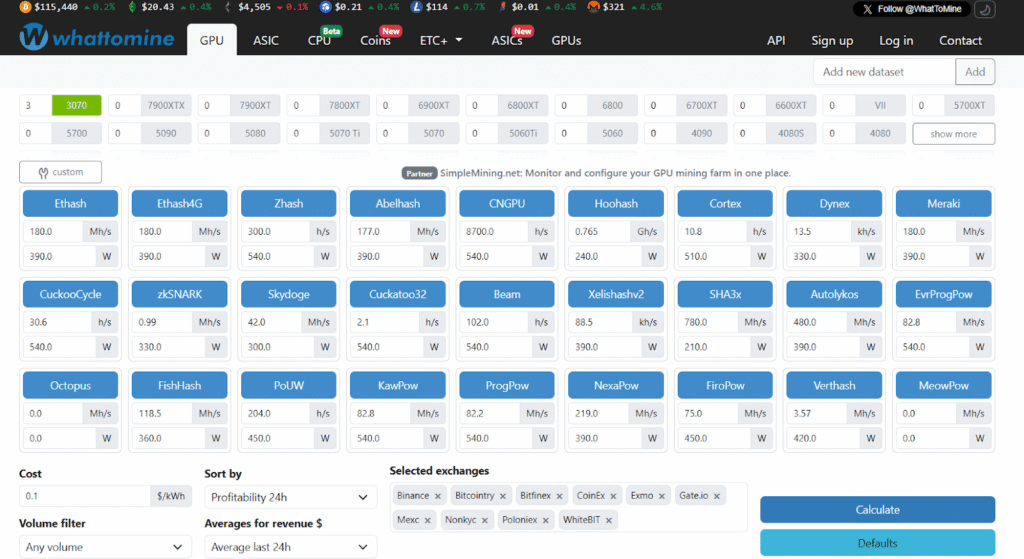
Screenshot of the WhatToMine web interface (GPU tab), where miners can input their hardware details and compare profitability across algorithms and coins (Source: WhatToMine)
Features
WhatToMine is packed with features that cater to both casual and advanced miners. It supports a wide range of mining algorithms and cryptocurrencies, allowing users to estimate profitability for GPUs and ASICs across dozens of coins simultaneously.
The site comes pre-loaded with hash rate benchmarks for all popular graphics cards, so you can simply select your GPU model and quantity instead of entering hash rates manually.
Based on your inputs, WhatToMine will list coins and algorithms sorted by estimated profit, making it easy to identify the most lucrative options for your hardware. You can calculate projected earnings on different timeframes (hourly, daily, weekly, monthly, etc.) and even see multi-algorithm or dual-mining possibilities (for example, mining two coins concurrently).
Advanced settings let you adjust parameters like electricity cost per kWh, mining pool fee, and choose which exchange’s prices to use for coin values, giving you a customized result that reflects your situation.
There are also extra tools: a “Miners†tab to check profitability of specific mining hardware models, an ETH+ tab for dual-mining, and interactive charts for historical reward trends.
WhatToMine even offers web widgets, allowing website owners to embed live profitability data on their own pages.
Interface
The WhatToMine interface is utilitarian but effective. At the top, you’ll find tabs for GPU, ASIC, Coins, LTC+, Miners, etc., which organize the calculator’s different modes. The default GPU tab (as shown in the screenshot above) displays a grid of algorithms with pre-filled hash rates and wattages for a default GPU setup (historically 3× Radeon 480 cards).
Users can adjust these values or select different GPU models from drop-down menus. The interface then shows a table of coins with their mining metrics (algorithm, block reward, difficulty, current price, volume) and profitability metrics (estimated rewards, revenue in BTC and USD, profit after power costs). You can sort this table by 24h profit, 7-day average, etc., to analyze which coin is consistently profitable.
There’s also an ASIC tab where you can input ASIC hash rates or select known ASIC models to see profits per algorithm. The Coins tab allows you to pick a specific coin and input custom hash rate/power to get profitability for just that coin.
In the UI, filters are available to exclude coins with low volume or adjust difficulty assumptions, and a toggle in the corner enables a dark mode for those who prefer a darker theme.
Overall, WhatToMine’s interface is straightforward once you understand the basics of mining metrics. Usability is generally good: entering your data and clicking “Calculate†will update the profitability list immediately. For example, “the default page gives profitability estimates for various algorithms… Change this to your preferred GPU and number of cards… then include more cards or different cards by typing a value next to an algorithm.†This dynamic input system makes it easy to model multi-GPU rigs of mixed types.
However, for absolute beginners the interface can feel a bit overwhelming at first glance – it’s essentially a big spreadsheet of numbers. As one review notes, “it’s not as straightforward to use, especially for people who do not understand what mining is.â€
New users might need to familiarize themselves with terms like hash rate, difficulty, and power consumption to get full value from the tool. Fortunately, the site’s design is clean (if utilitarian) and there are guides available (for instance, mining pool blogs have published how-to guides for using WhatToMine) to help newcomers get started.
Once you know what numbers to plug in, WhatToMine is quite simple and intuitive to use – no registration required, and all calculations happen instantly in your browser. The combination of powerful features and a no-frills interface has made WhatToMine a staple in the mining community.
Comparison with Other Mining Profitability Tools
While WhatToMine is a leader in mining calculators, there are several other tools that crypto miners use to gauge profitability. Here’s how WhatToMine compares to some notable alternatives in the market:
NiceHash Profitability Calculator

NiceHash, known as a major hashpower marketplace, provides its own profit calculator for users who want to see earnings from renting out their hardware’s hashing power on NiceHash. It supports a wide range of over 300 mining devices (GPUs and ASICs) and offers a polished interface with side-by-side device comparison charts.
A key difference is that NiceHash’s calculator is oriented toward their marketplace payouts (usually in Bitcoin), rather than mining a specific altcoin directly. It’s very user-friendly – you can select your exact GPU/ASIC model from a list and it will auto-fill the hash rate and power consumption, then show your daily, weekly, and monthly profits at current rates.
NiceHash also allows comparing multiple devices to help decide which hardware is more profitable. However, NiceHash’s calculator lacks some of WhatToMine’s breadth – it doesn’t list dozens of individual coins, only the profit you’d make via NiceHash’s algorithm marketplace. It also doesn’t provide yearly projections (only up to monthly). In summary, NiceHash’s tool is excellent for quick hardware profit comparisons and has a sleek UI, but it’s focused on the NiceHash ecosystem and not as comprehensive in coin selection as WhatToMine.
Minerstat Mining Calculator

Minerstat is a mining management platform that also offers a powerful web-based profitability calculator. Like WhatToMine, Minerstat supports GPUs and ASICs and lets you input your hardware and electricity cost to see expected profits.
In fact, Minerstat’s interface is praised as “wonderful – everything is precise and to the point.†One advantage of Minerstat is its integration with real-time mining data: you can include multiple algorithms, see which mining pools or hashrate marketplaces (like NiceHash) are available for each algorithm, and even factor in pool fees or choose 3h/6h/24h average revenues for more nuanced estimates. This makes Minerstat ideal for advanced users optimizing which pool or software to use.
The calculator also allows fine-tuning by editing the hashrate for each algorithm on your device (useful if you’ve overclocked or underclocked). Feature-wise, Minerstat and WhatToMine are closer, but Minerstat might appeal to those who want to log in and save their hardware profiles or integrate with Minerstat’s mining OS.
A minor downside is that some features require a Minerstat account login (since it ties into their full platform). By contrast, WhatToMine is completely open with no login needed. Also, WhatToMine covers a broader array of obscure coins, whereas Minerstat’s focus is on the major algorithms and pools it supports. Both are free tools; serious miners might use Minerstat for its extra analytics alongside WhatToMine for a second opinion.
CoinWarz
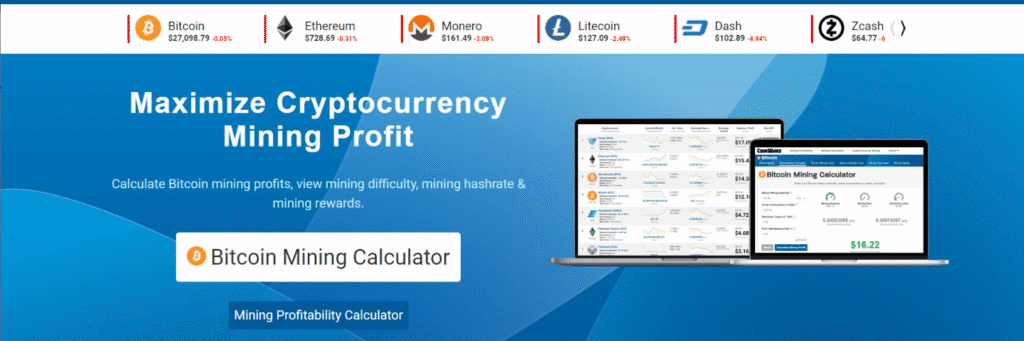
CoinWarz is one of the older mining profit calculator websites. It offers calculators for many individual coins as well as an overall profitability list per algorithm. The interface is extremely simple – perhaps even a bit dated – with a very basic form and lots of whitespace (and some ads).
Ease of use is CoinWarz’s strong suit: you select a mining algorithm from a dropdown, enter your hash rate, power usage, and electricity cost, then it shows a list of coins using that algorithm ranked by profitability. The output includes details like each coin’s difficulty, block reward, daily revenue, and profit, and even how many days to mine the equivalent of 1 BTC at your rates.
That simplicity makes CoinWarz quite beginner-friendly, but it comes with limitations. The site tends to focus on major algorithms (SHA-256, Ethash, etc.), so niche altcoins might not appear. In fact, CoinWarz’s primary calculator page is often used for Bitcoin or Ethereum, and one review noted that it “supports only Bitcoin†on its main calculator by default – you have to manually switch to other coins.
Also, the data may not be as detailed or frequently updated as WhatToMine’s (CoinWarz auto-loads current difficulty and price for calculations, but it may not list small exchanges or allow custom settings beyond basics).
In short, CoinWarz is a quick and easy tool if you want to check profitability for a given algorithm with minimal fuss. However, compared to WhatToMine, it lacks advanced options and the extensive coin coverage. It’s best suited for checking well-known coins one at a time, whereas WhatToMine shines in comparing dozens of coins across multiple algorithms at once.
CryptoCompare’s Mining Calculator
CryptoCompare is a popular crypto data site that includes a simple mining calculator. Unlike WhatToMine, CryptoCompare’s tool is coin-specific – you choose one of a handful of supported coins (Bitcoin, Ethereum, Litecoin, Monero, etc.) and input your hash rate, power, cost, etc.
The calculator will then display your estimated profit per day, week, month, and year for that coin. A nice feature is that it updates results in real-time as you adjust the inputs, without needing a page reload. CryptoCompare’s interface is very clean and over-simplified by design: it assumes a fixed electricity cost by default (which you can override) and doesn’t concern itself with which hardware you have. The simplicity is both a pro and a con. For someone brand new, it’s straightforward – there’s no list of dozens of coins to confuse you, just the coin you selected.
However, CryptoCompare supports only about 7 major cryptocurrencies for mining calculations. It does not let you compare different hardware or algorithms; nor does it include GPUs/ASIC selection. Essentially, it’s a basic profitability calculator for single coins, which is quite limited compared to WhatToMine’s comprehensive approach. Advanced miners rarely use CryptoCompare’s calculator, but an investor or casual user might use it to quickly check if, say, “Is it profitable to mine Ethereum Classic with my hash rate?†(assuming they manually know their hash rate). In summary, CryptoCompare’s tool is overly simplistic and lacks features, making it unsuitable for detailed mining planning.
WhatToMine, on the other hand, is built for miners’ needs – covering many coins and allowing hardware comparisons – which is why it remains the preferred choice for the mining community.
Use Cases for Different Users: Beginners, Hobbyist Miners, Large-Scale Operations, and Investors
Different types of users can benefit from WhatToMine in distinct ways. Here are some common use cases and how each group might utilize the calculator:
- Beginners: Newcomers to crypto mining often wonder “What should I mine with my hardware?†WhatToMine is an invaluable starting point for them. It simplifies the process of coin selection by hard-coding popular GPU hash rates and listing profitable coins automatically.Â
A beginner can select their graphics card from the list and immediately see which coins might earn them a profit. This saves hours of research, as the tool crunches network data and prices for you.
That said, beginners may face a learning curve understanding the interface and terminology – the site assumes some knowledge of mining metrics, and it’s “not as straightforward to use for people who don’t understand what mining is.†To use it effectively, a novice should first learn basic terms like hash rate (mining speed) and watts (power draw). Many beginners use WhatToMine to experiment: for example, they can tweak the electricity cost to see at what price mining becomes unprofitable, or change the coin and observe how expected earnings change.
Overall, WhatToMine helps beginners by providing a clear picture of mining profitability and guiding them toward suitable coins, while also teaching the impact of different factors on mining income.
- Hobbyist Miners: These are individuals mining at home with one or a few rigs (GPUs or a small ASIC setup) as a hobby or side-income. For hobbyist miners, WhatToMine is almost a daily dashboard. They often check it regularly to decide which coin to mine today for maximum return.Â
Since hobbyists typically pay residential electricity rates, being on the most profitable coin can make the difference between a small profit or a loss. WhatToMine allows hobbyists to input multiple different GPUs they might have in their rig (Nvidia and AMD mixed, for instance) and see a combined profitability estimate – a feature that saves them from manual calculation. They also use filters on WhatToMine (e.g. volume filters or specific exchanges) to ensure they mine coins that they can actually sell easily. In practice, a hobbyist might wake up and see that, for example, Ravencoin is more profitable than Ethereum Classic on their setup; armed with that info from WhatToMine, they might switch their mining software to Ravencoin for the day.
That kind of on-the-fly coin switching is facilitated by the real-time data WhatToMine provides. Hobbyist miners also use WhatToMine to monitor trends – for instance, if a normally unprofitable coin suddenly jumps in profitability (perhaps due to a price spike), WhatToMine will show it, and the hobbyist can capitalize on the opportunity early.
- Large-Scale Mining Operations: Mining farm operators and professional miners use WhatToMine as one of their reference tools for high-level planning. While large operations often have custom software and analytics, WhatToMine is still useful for a quick check or initial research.Â
A large-scale operation with hundreds of GPUs might use WhatToMine to decide which coin to dedicate most of their hash power to, or when considering new hardware, to compare how different GPUs or ASICs perform profit-wise. For example, before investing in a new model of ASIC, they might plug its specs into WhatToMine to see the projected ROI given current conditions. Electricity cost management is crucial for big miners, so they might run scenarios in WhatToMine with different $/kWh inputs to determine viability in various locations or with different energy contracts.
WhatToMine’s ability to show profitability across multiple exchanges is also handy – large miners can see if selling mined coins on a specific exchange yields better returns. Additionally, even though farms have sophisticated tools, WhatToMine’s data on network difficulty and block rewards serves as a double-check or quick sanity test. It’s a fast way to ensure they’re mining the right coin; if not, the opportunity cost could be huge at scale. In summary, big operations use WhatToMine for rapid analysis and decision support, complementing their in-house tools.
- Investors and Crypto Analysts: Interestingly, WhatToMine isn’t just for people who actively mine – it can also be useful to investors or analysts who want insight into the mining aspect of a cryptocurrency. For instance, an investor evaluating a Proof-of-Work coin might check WhatToMine to see its profitability for miners. If a coin is highly profitable to mine, it could indicate strong network participation; if it’s unprofitable, miners might shut down, potentially affecting the coin’s security and future price.Â
Investors also use mining calculators to estimate break-even points – for example, “Given the current price and difficulty, what is the break-even electricity cost for mining this coin?†Such analysis can reveal whether a coin’s market price is above or below its implied mining cost. Additionally, an investor considering buying mining equipment to diversify their investments would definitely use WhatToMine to project earnings and payback time on that hardware.
They can compare, say, buying $10,000 of GPUs versus buying $10,000 worth of Bitcoin directly, using WhatToMine’s data to see how quickly the mining might pay off. While not all investors delve into these details, those who want a clear overview of potential mining gains use calculators like WhatToMine as a research tool.
In short, WhatToMine provides valuable insights for investors by quantifying mining profitability, thus informing investment decisions related to mining and offering a deeper understanding of the economics behind the coins they invest in.
Pros and Cons of Using WhatToMine
Like any tool, WhatToMine has its strengths and weaknesses. Here’s a balanced look at the pros and cons:
Pros
- Comprehensive Coin and Algorithm SupportÂ
WhatToMine supports a huge range of algorithms, coins, GPUs, and ASICs, making it one of the most feature-rich mining calculators available. It covers everything from mainstream coins to obscure altcoins, all in one place.
- Detailed Profitability Comparisons
It allows you to compare profitability across different algorithms and hardware. You can see, for example, which algorithm yields the best profit on your GPU or which coin is most profitable for a given algorithm, all side-by-side. This level of detail helps miners optimize what they mine for maximum returns.
- Customizable and Advanced Settings
The calculator provides many adjustable parameters. Users can input custom hash rates, power consumption, electricity cost, pool fees, and even pick which exchange prices to base calculations on. It also supports dual mining calculations (mining two coins simultaneously) and shows hourly, daily, weekly, monthly, and yearly estimates for earnings and costs. This flexibility caters to both basic and advanced use cases.
- No Login, Free, and Quick to Use
WhatToMine is completely free to use (it’s supported by ads/donations). There’s no registration or installation required – just go to the website and start calculating. The interface, while data-heavy, is optimized for quick changes: “simply enter your material and electricity cost and the platform will calculate your estimated profitability.†For regular users, it becomes a very quick and intuitive tool for daily checks.
- Regular Updates and Real-Time DataÂ
The site pulls in up-to-date network data (like current prices, network difficulty, block rewards) for each coin. As noted, WhatToMine provides “real-time profitability estimates†by constantly updating coin stats. This means your results reflect current market conditions. Many coins’ data is updated every few minutes, giving you a live snapshot of profitability.
- Community Trust and Widgets
Because it’s been around for years and widely used, WhatToMine is considered a trusted benchmark in mining communities. Its profitability rankings are often referenced in forums when discussing mining. Additionally, it offers embeddable web widgets so third-party sites or blogs can display live mining profitability info for certain coins or hardware – a unique perk for community and content creators.
Cons
- Not Beginner-Friendly at First Glance
While powerful, WhatToMine can be intimidating for first-time users. The interface is essentially a spreadsheet of technical data, and understanding what to input (and what the results mean) requires some basic mining knowledge. It’s been noted that “it’s not as straightforward to use, especially for people who do not understand what mining is.†Beginners may need to read a guide or tutorial to use it effectively, whereas some simpler calculators are plug-and-play with less info.
- No Direct Support for CPU MiningÂ
WhatToMine focuses on GPU and ASIC mining. There isn’t a dedicated section for CPU mining or for entering CPU models. CPU miners would have to manually enter their hash rate on a specific coin’s page in the “Coins†tab, which is less convenient. In practice, CPU mining is a smaller niche, but if you primarily mine with CPUs, WhatToMine doesn’t cater to you as directly as it does to GPU/ASIC users.
- Requires Accurate Inputs & Uses Averages
The accuracy of WhatToMine’s estimates hinges on the user providing correct inputs (hash rate, power, costs) and on average network conditions. The site itself warns that calculations are based on mean values and your actual results may vary. It does not predict future changes in difficulty or price – it’s a snapshot in time. Thus, if a coin’s difficulty is rapidly increasing or its price is volatile, the profitability shown on WhatToMine could be very different from what you realize over a longer period. Users must interpret the data with caution and understand it’s an estimate, not a promise.
- Lacks Hardware Cost and ROI CalculationÂ
Unlike some mining calculators or profitability tools, WhatToMine doesn’t directly factor in the cost of hardware or tell you how long to break even on a new miner purchase. Some other calculators (for example, on 99Bitcoins) allow you to input your hardware cost and will compute how many days or months of mining to pay off that cost. WhatToMine’s focus is strictly on ongoing operating profitability (revenue minus electricity). So miners have to do that ROI math separately. This isn’t a deal-breaker, but it’s a feature some might miss.
- Occasional Missing Niche Coins or Data GapsÂ
While WhatToMine covers a lot of coins, it may not list every single mineable coin, especially very new or low-liquidity projects. The site operators typically add coins that have an established network and exchange listing. If you’re hunting for brand-new coins right after launch, they might not appear on WhatToMine until they gain traction. Additionally, sometimes data may be temporarily outdated if a coin’s API (data feed) fails – for example, a coin’s price might not update if the exchange API is down. These are minor issues, and generally the site is well-maintained, but worth noting for completeness.
Despite a few cons, WhatToMine’s pros far outweigh its drawbacks for most users. It remains an indispensable tool by offering detailed and customizable profitability insights that few other platforms can match.
Frequently Asked Questions
What is WhatToMine?
WhatToMine is an online cryptocurrency mining profitability calculator. It allows miners to evaluate how profitable different coins are to mine by inputting their hardware information (GPU/ASIC type or hash rate) and electricity costs. In other words, it answers the question “what should I mine?†based on current market conditions, hence the name “What to Mine.†It’s widely used in the crypto mining community as a go-to tool for this purpose.
How does WhatToMine work?
WhatToMine works by taking into account key mining factors and giving you an estimate of earnings. You provide the hash rate of your miner (or select your hardware model), the power consumption (in watts), and your electricity price. The calculator then uses up-to-date data for each coin’s block reward, network difficulty, and price to compute your expected revenue per day (or other timeframes). It subtracts your electricity cost to give a profit estimate. Essentially, WhatToMine crunches the numbers for dozens of coins in real time, showing which coin would be most profitable to mine with your setup. Keep in mind the calculations assume current averages – if difficulty or price changes, profitability will adjust accordingly.
How do I use WhatToMine?
Using WhatToMine is straightforward once you know your hardware specs. First, go to whattomine.com – by default you’ll land on the GPU page. There, you can select your GPU model(s) from the list or manually enter your hash rate for various algorithms. Enter the number of cards and your electricity cost in $/kWh. Then click the “Calculate†button. The site will display a table of coins with their estimated daily revenue and profit (after power cost) for your inputs. For ASIC miners, switch to the ASIC tab and either choose your device or input the hash rate for the algorithm it mines.
You can also use the Coins tab to pick a specific coin and calculate profitability for that coin alone. It’s recommended to fill in all fields accurately (especially power usage and cost) for the best results. In summary: select your hardware, input hash rate & power, input electricity cost, then calculate – WhatToMine will do the rest and show you the profit estimates for multiple coins.
Is WhatToMine free to use?
Yes – WhatToMine is completely free. You don’t need to create an account or pay any fee to use the calculator’s features. The website is supported by ads and donations. All the profitability information and coin data is openly accessible. This makes it easy for anyone to check mining profits at any time. Just be cautious of imposter sites; always use the official whattomine.com URL to avoid any scams, since the legitimate tool doesn’t require login or personal info.
How accurate are WhatToMine’s profit estimates?
WhatToMine provides estimates based on current data, which are generally accurate for a snapshot in time but cannot guarantee future profits. The calculator assumes average mining difficulty and coin prices at the moment of calculation.
In reality, those factors can change – for example, if many miners start mining a coin, the difficulty will rise and actual profits will be lower than initially estimated. Also, WhatToMine’s default hash rates and power consumption for GPUs are based on reference values; if your hardware is overclocked or underperforming, your results will differ. Most miners find WhatToMine “very accurate†for comparing profitability across coins, as long as you input precise data and understand it’s an estimate. Always consider that pool fees, variations in luck, and future difficulty adjustments can cause actual earnings to deviate. It’s wise to use WhatToMine’s numbers as a guideline and periodically update the calculation rather than relying on a single static prediction.
Does WhatToMine support ASIC and CPU mining?
WhatToMine fully supports ASIC miners and GPU rigs, but it has limited support for CPU mining. There is an ASIC tab where major ASIC models (for Bitcoin, Litecoin, etc.) are listed – you can select an ASIC or input its hash rate and get profitability for relevant coins/algorithms. For GPU mining, it’s very comprehensive (covering Nvidia and AMD cards and all GPU-mineable coins). CPU mining, however, doesn’t have a dedicated section.
You won’t find CPU models listed on the main page. That said, you can still use WhatToMine for CPU-mined coins by going to the Coins tab, selecting the coin (like Monero for example), and entering your CPU’s hash rate manually. The calculation will work, but it’s not as convenient as the GPU/ASIC sections. The omission is likely because pure CPU mining is less common/profitable nowadays, and many CPU-mineable coins are also GPU-mineable. In summary: ASICs and GPUs – Yes (first-class support). CPUs – partially (manual input needed).
Why is using a mining profitability calculator important?
Whether you’re a hobby miner or running a farm, a mining calculator like WhatToMine is crucial to gauge the financial feasibility of your operation. It helps you answer questions like: “Am I making profit or losing money with my current setup?†and “Which coin should I mine to maximize returns?†Without a calculator, you’d be guessing or doing tedious manual math for each coin. These tools factor in all the complex variables – hash rate, power cost, difficulty, block rewards, coin price – and output a clear profit estimate.
This allows you to make informed decisions, such as switching to more profitable coins, upgrading hardware, or stopping mining if it’s unprofitable. In a volatile market, calculators also help with risk management by letting you simulate scenarios (e.g., what if electricity gets 20% more expensive, or coin price drops by 30%?). In short, using a mining profitability calculator is an essential step for anyone serious about mining, as it provides data-driven insight and keeps you responsive to market changes.


