
CoinLedger Review: The Ultimate Crypto Tax Software Guide
CoinLedger is a popular cryptocurrency tax software designed to make filing crypto taxes easy for investors of all experience levels.
If you’ve been wondering what CoinLedger is, how it works, whether it’s safe and legit, and how much it costs, this in-depth guide has you covered. We’ll also compare CoinLedger to other crypto tax tools and provide step-by-step tips on using it.
By the end, you’ll see why CoinLedger is considered one of the best crypto tax solutions.
Keep reading to get the CoinLedger discount code!

What Is CoinLedger?
CoinLedger (formerly known as CryptoTrader.Tax) is an online platform that automates cryptocurrency tax reporting.
Founded in 2018 in the U.S., CoinLedger has since processed over $70 billion in crypto transactions for more than 500,000 users.

CoinLedger founders (Source: Google)
In simple terms, the software acts as a bridge between your exchange/wallet data and your tax forms. It securely imports your crypto trading history and generates accurate tax reports in minutes.
Key features of CoinLedger include support for 20,000+ cryptocurrencies and integration with most major exchanges and wallets (Coinbase, Binance, Kraken, MetaMask, Ledger, and many more).
It handles everything from regular trades to complex DeFi and NFT transactions. The software calculates your capital gains/losses and any crypto income (staking rewards, airdrops, etc.), then produces the necessary tax documents (like IRS Form 8949 in the US) automatically. This means even if you trade on multiple platforms or blockchains, CoinLedger consolidates all that data into one comprehensive report – saving you countless hours of manual tracking.
Another big plus is that CoinLedger isn’t limited to U.S. taxes. It can generate country-specific tax forms for a growing list of jurisdictions including the United States, United Kingdom, Canada, Australia, Japan, South Africa, and many EU countries, among others.
Users in other countries can still use CoinLedger to calculate gains and get summary reports (then manually input the numbers into local tax forms). By staying current with international tax rules and offering localized guidance, CoinLedger helps crypto investors worldwide stay compliant.
How Does CoinLedger Work?
CoinLedger works by automating the entire crypto tax calculation process.
Here’s a breakdown of how the platform operates behind the scenes:
- Secure Data Import: You start by connecting your crypto sources to CoinLedger. The platform supports 1,000+ integrations (exchanges, wallets, DeFi protocols) via API or CSV. For exchanges that allow API keys, you provide CoinLedger with a read-only API key – this lets CoinLedger import your transaction history without any access to move funds (it’s strictly view-only for security).Â
If an exchange or wallet doesn’t support API, you can upload your transaction CSV file, or simply input a public wallet address for blockchain transactions. CoinLedger even pulls NFT trades directly from the blockchain when you input your wallet address. All these methods ensure every crypto transaction you made in the tax year is captured.
- Automatic Transaction Classification: Once your data is imported, CoinLedger automatically classifies each transaction and calculates the cost basis, proceeds, and resulting gain or loss. It knows, for example, to treat a coin purchase vs. a coin sale appropriately, and it assigns fair market values to income events like mining or staking rewards.Â
The software uses your chosen accounting method (FIFO, LIFO, etc.) to calculate gains. In minutes, CoinLedger generates a full breakdown of your taxable crypto gains and income for the year.
- Tax Report Generation: After crunching the numbers, CoinLedger lets you preview the results. You can see your total capital gains or losses, income, and even which trades might qualify for tax-loss harvesting (selling at a loss to offset gains). Once everything looks good, you can pay for a tax report and download official tax documents for your country.Â
For U.S. users, CoinLedger produces filled-out IRS forms (like Form 8949 and Schedule D) ready to file. Other countries get equivalent forms (e.g., HMRC capital gains summary for the UK, CRA Schedule 3 for Canada, etc.). In fact, CoinLedger supports full tax form generation for 15+ countries, and provides standardized gain/loss reports for everywhere else. You can directly import these reports into popular filing software like TurboTax, TaxAct, or send them to your accountant.
Behind the scenes, CoinLedger’s technology emphasizes accuracy and compliance. Every transaction is tracked with time stamps and historical prices, ensuring your calculations are correct to the penny. The platform even generates an audit trail report showing how each number was derived, so you have proper records if the tax authorities ever ask.
In short, CoinLedger turns the daunting task of crypto taxes into a mostly hands-off process – connect your accounts, let it crunch the data, and download your ready-to-file forms.
How to Use CoinLedger (Step-by-Step)
Getting started with CoinLedger is very straightforward, even if you’re not a techie.
Here’s a step-by-step guide on how to use CoinLedger to prepare your crypto taxes:
- Sign Up for a Free Account: Visit the CoinLedger website and create a free account using just your email. All new users can register and start importing data without any upfront cost (you only pay when you need to download official tax reports). The platform is cloud-based, so there’s nothing to install.

CoinLedger sign up screen (Source: CoinLedger)
- Import Your Transactions: Once logged in, begin adding your crypto sources.Â

Add account screen (Source: CoinLedger)
For each exchange, wallet, or platform you used:
- If the exchange supports API integration, enter your API keys (read-only) into CoinLedger. For example, you can connect Coinbase, Binance, Kraken, etc. via API in a few clicks. CoinLedger will securely fetch your trade history.
- For wallets or DeFi protocols, simply input your public wallet address (e.g. your Ethereum address for MetaMask, or Solana address for Phantom). CoinLedger will scan the blockchain and import all transactions tied to that address (such as NFT trades or DeFi yield farming income).
- If neither API nor address applies (or if you prefer), you can upload CSV files of your transaction history, which most exchanges allow you to download.
- You can add unlimited exchanges and wallets in CoinLedger, so be sure to include all the platforms you used in the tax year for accuracy. The interface will walk you through each addition. This import step is crucial but only needs to be done once per source.
- Review Your Crypto Tax Summary: After importing, navigate to the tax reports section. CoinLedger will automatically categorize your transactions and display a summary of your capital gains/losses and crypto income for the year. Take some time to review this dashboard:
- Check if all your trades are accounted for (CoinLedger flags any missing cost basis or other issues with an error reconciliation tool).
- See your capital gains total – broken down by short-term vs long-term if applicable.
- See your total income from crypto (like staking, mining, airdrops).
- Utilize the tax-loss harvesting report to identify any assets you sold at a loss that could offset other gains (this can potentially save you money).
- The platform’s portfolio tracker (free) also lets you see your current holdings and unrealized gains, which is a nice bonus for planning purposes.
- Check if all your trades are accounted for (CoinLedger flags any missing cost basis or other issues with an error reconciliation tool).
- Download Your Tax Reports: Satisfied that everything looks correct? The final step is to generate your tax report. Choose the tax year and the type of report you need (CoinLedger will suggest forms based on your country). You’ll be prompted to select a plan if you’re on the free tier. Simply pick the appropriate plan based on your number of transactions (more on pricing in the next section) and proceed to checkout. Once paid, you can download all your crypto tax forms instantly. CoinLedger will provide:
- Tax Form PDFs (like the filled IRS Form 8949, Schedule D, or other country-specific forms ready to file).
- Detailed CSV reports (transaction history, capital gains report, income report, audit trail, etc.).
- TurboTax/TaxAct import files if you want to e-file using those programs.
- Tax Form PDFs (like the filled IRS Form 8949, Schedule D, or other country-specific forms ready to file).
- Save these files for your records. You can now confidently file your taxes knowing CoinLedger did the heavy lifting. 🎉
That’s it! From start to finish, using CoinLedger can take as little as 20 minutes once you have your exchange APIs and files ready. The platform is designed to be user-friendly – even if you’re a crypto newbie, no advanced tax knowledge is needed to navigate it. If you get stuck, CoinLedger’s support team is readily available via live chat or email to help (more on their support later).
Is CoinLedger Safe and Legit?
Security is a top concern whenever you’re dealing with financial data.

CoinLedger trust score (Source: Trustpilot)
The good news is CoinLedger is both safe and legitimate – it has built a strong reputation since launching in 2018. Here are several reasons you can trust CoinLedger with your crypto tax needs:
- Established and Trusted: CoinLedger was founded in 2018 by a team of crypto-savvy entrepreneurs and has grown into one of the leading crypto tax solutions. It’s a reputable, established company with hundreds of thousands of users worldwide. The platform boasts an excellent reputation among the crypto community, which speaks to its legitimacy. (Fun fact: CoinLedger started under the name CryptoTrader.Tax and rebranded to CoinLedger, reflecting its expanded offerings.)
- Read-Only Access: When you connect exchanges or wallets, CoinLedger uses read-only API keys and public addresses, meaning it never has the ability to move your funds. It can only view transaction history. This significantly limits risk – even if somehow there were a breach, hackers can’t steal your crypto via CoinLedger because the software cannot perform withdrawals or trades. You remain in full control of your assets.
- Data Security Measures: CoinLedger employs industry-standard security practices to protect user data. According to company reports, they use 256-bit encryption for data storage, secure hosting environments (virtual private cloud), and regular security audits. Your account is password-protected (always use a strong, unique password and enable 2FA if available). Payments on the platform are handled via secure, PCI-compliant processors, so your billing info is safe as well.
- No Reporting to Tax Agencies: Privacy-conscious users will appreciate that CoinLedger does not automatically report any data to the IRS or other tax authorities. It’s a tool for you to generate your tax documents, not a pipeline feeding your info to the government. You alone decide if and when to file the reports CoinLedger produces. (Of course, you’re legally obligated to report taxes, but the point is CoinLedger won’t share your data without your consent.)
- Money-Back Guarantee: CoinLedger is confident in its service. They offer a 14-day money-back guarantee for new users. If you’re unhappy or encounter an issue, you can get a refund—no questions asked. This policy shows that the company stands behind its product and adds an extra layer of trust for users on the fence.
- Incident Transparency: In terms of security history, CoinLedger has had a very clean track record overall. There was an isolated incident back in 2020 where around 1,000 users’ email data was compromised by a hacker. The breach did not involve any crypto assets (since CoinLedger doesn’t hold private keys) and the team promptly patched the vulnerability. Importantly, no incidents have occurred since, and CoinLedger implemented additional safeguards to prevent future issues. Being transparent about this shows CoinLedger’s commitment to trustworthiness – they addressed the problem and learned from it.
- Community & Reviews: If you search online or on social media, you’ll find largely positive feedback about CoinLedger. Users often mention that the software is legit and reliable, saving them time and helping avoid tax headaches. In fact, CoinLedger has an average rating of 4.7/5 based on over 1,200 customer reviews (as of 2025). Many CPAs and tax professionals also recommend CoinLedger for their crypto clients. This community validation further confirms that CoinLedger is a legit service delivering real value.
In summary, you can feel confident that CoinLedger is a safe platform to use. Your exchange connections are secure and read-only, your personal data is encrypted, and the company has a solid reputation in the industry.
As with any online service, practice good security hygiene on your end (strong passwords, etc.), but rest assured CoinLedger takes its security and legitimacy seriously.
CoinLedger Pricing – Is It Free and How Much Does It Cost?
One of CoinLedger’s selling points is its simple and transparent pricing.
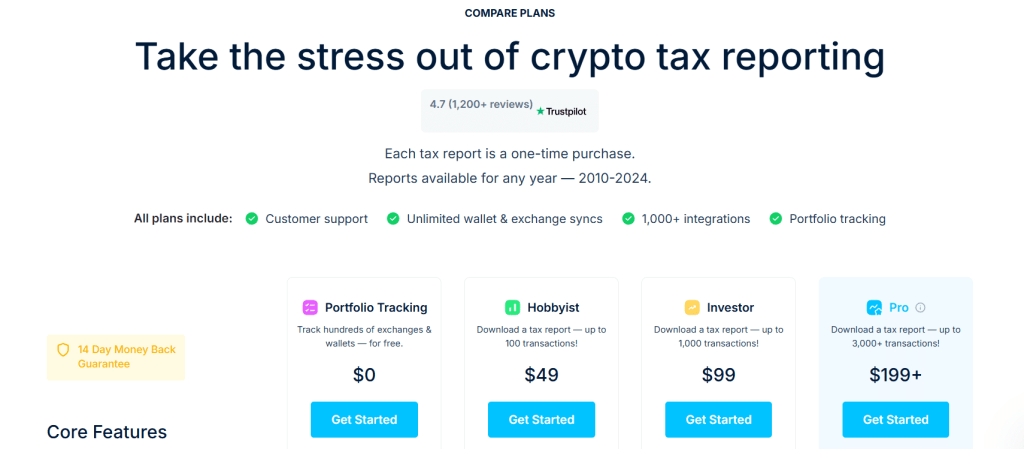
Pricing plans (Source: CoinLedger)
The platform offers a free tier for basic use and flat-fee packages when you need to generate tax reports. Here’s the breakdown:
- Free Account (Portfolio Tracking): It is free to sign up and import all your data into CoinLedger. You can add unlimited exchanges/wallets and view your entire crypto tax summary without paying a dime. This free access includes features like the portfolio tracker, capital gains overview, and even tax-loss harvesting analysis. Essentially, you can use CoinLedger as a portfolio tracking tool year-round and see your unrealized tax position for free. However, the free plan does not let you download official tax reports. It’s meant for tracking and preview purposes only.
- Paid Tax Reports: To actually obtain your tax forms for filing, you’ll need to upgrade to one of CoinLedger’s paid plans. These are one-time purchases per tax year (not a recurring subscription). The cost is based on how many transactions you had in the year:
- Hobbyist – $49: covers up to 100 transactions for the year.
- Investor – $99: covers up to 1,000 transactions.
- Pro – $199: covers up to 3,000 transactions (and even more; heavy users can purchase additional transaction packs or an unlimited tier as needed).
- Hobbyist – $49: covers up to 100 transactions for the year.
- Note: A “transaction†in this context is any taxable event: a trade, a crypto payment, an income event, etc. If you only made a few trades, you fall in the Hobbyist tier; if you traded actively on multiple exchanges, you might need Investor or Pro. All paid plans include the same features and reports – the only difference is the transaction limit. For example, the $99 plan doesn’t give you anything “more†than the $49 plan except the ability to handle a larger number of trades.Â
CoinLedger’s pricing is very competitive, especially compared to some rivals. The top-tier plan at $199 covers most power-users, and even if you exceed 3,000 transactions, the fees for additional transactions are reasonable (many users won’t need to go beyond Pro tier).
- Is CoinLedger really free? Many people ask if CoinLedger is free to use. The answer is yes, to start – you can do everything up to reviewing your calculated tax results for free. But if you want to actually generate and download the completed tax forms, you’ll need to pay for a report.Â
In short, CoinLedger’s free plan allows unlimited transaction imports and tax preview, but tax form downloads start from $49 per tax year. This model is actually great because you only pay when you’re satisfied and ready to file; there’s no risk of paying upfront only to find the software doesn’t meet your needs.
- Done-For-You Services (Optional): For those who absolutely don’t want to deal with taxes at all, CoinLedger also offers a “Professional Services†option. This is essentially an in-house tax expert who will handle your crypto tax return for you (for an additional fee). You still connect your accounts in CoinLedger, but their professional will review your data, ensure everything is correct, and even file your taxes on your behalf if you desire.Â
This service is geared towards complex cases or people who prefer white-glove treatment. Pricing for the full professional filing service varies (it can be a few hundred dollars extra, depending on complexity). Most users will be fine with the DIY software, but it’s good to know CoinLedger has your back with expert help if needed.
Overall, CoinLedger’s pricing is affordable and scalable. For a casual investor with a few trades, $49 for an annual report is a small price to pay for peace of mind. For high-volume traders, $199 to $299 is still quite reasonable given the time it saves and the potential thousands in tax savings it might identify. Plus, unlike subscription software, you’re not locked into continuous payments – you can skip years if you don’t trade, etc., just buying a report for the years you need. And remember, if you’re unsatisfied, there’s that 14-day refund window to ensure you’re getting value.
Comparison: In the next section, we’ll compare CoinLedger’s pricing and features to other crypto tax platforms. But spoiler – CoinLedger holds up well, often coming out equal or cheaper for similar functionality.

Benefits of Using CoinLedger
Beyond the basic “it calculates your taxes†functionality, you might be wondering what sets CoinLedger apart and what benefits you gain by using it. Cryptocurrency taxation has only grown more complex with new regulations and the rise of NFTs, DeFi, and more. CoinLedger is continually evolving to integrate emerging technologies and to make crypto tax reporting as painless as possible.
Let’s explore two major benefits: staying compliant with accuracy (thanks to blockchain tech), and a user-friendly experience backed by solid support.
Tax Compliance and Blockchain Accuracy
One of the biggest advantages of CoinLedger is how well it helps you stay compliant with tax laws while leveraging the accuracy of blockchain data:
- Up-to-Date Tax Compliance: Crypto tax rules aren’t static – governments worldwide keep adjusting regulations. CoinLedger’s team stays on top of the latest tax codes (for example, any new IRS guidance or changes in how DeFi is taxed) and updates the software accordingly. We’re seeing more clarity in laws, and CoinLedger incorporates these into its calculations.Â
It generates all the required tax forms for your country so you don’t have to worry about missing documentation. From IRS Form 8949 in the US to HMRC reports in the UK, CoinLedger has you covered. Using the software greatly reduces the chance of errors in your tax filing – which in turn means a lower chance of audits or penalties for you. It’s like having a diligent accountant who never gets tired or makes arithmetic mistakes.
- Blockchain-Based Accuracy: Because CoinLedger pulls data directly from exchanges and public blockchains, it leaves little room for human error. Every trade, transfer, and transaction is recorded immutably on the blockchain – CoinLedger taps into that source of truth to ensure your tax reports are accurate. This approach is even more critical now as many people have transactions spread across centralized exchanges, decentralized protocols, and multiple chains.Â
CoinLedger aggregates all that info seamlessly. For example, if you traded on Uniswap or earned yield in a liquidity pool, CoinLedger can retrieve those transactions from the blockchain when you provide your wallet address. The benefit here is accuracy: calculations are based on actual data (timestamps, values) fetched automatically, eliminating mistakes that might come from manual entry or forgetting a transaction. The software even factors in cost basis transfers (so moving crypto from one wallet to another isn’t counted as a taxable event) and tracks your coins’ history across wallets.
- Audit Trail and Transparency: CoinLedger gives you an audit trail report which details every single input and output of the tax calculation. This transparency is a huge benefit if you ever need to explain your taxes or if you just want to understand them better. You can see exactly how it arrived at the numbers (e.g., the cost basis for each trade, the FMV of each reward on the date received, etc.). This kind of detail is hard to compile on your own, but CoinLedger handles it automatically. Should the taxman ever ask questions, you’ll have a clear record to provide.
- Avoiding Common Pitfalls: The software also helps ensure compliance by flagging common issues. For instance, it can detect if you’re missing cost basis for certain coins (perhaps because you didn’t import an exchange). It also includes guidance on things like the wash sale rule or IRS income classification where applicable (through its blog and resources). By using CoinLedger, you’re far less likely to make a misstep like underreporting income or misidentifying a taxable event. It’s like having a crypto tax expert double-checking your work in real-time.
In essence, CoinLedger leverages technology to maximize accuracy and compliance. In the complex crypto landscape, that’s a significant benefit. You get to harness the power of direct blockchain integration and up-to-date tax knowledge, ensuring your tax report is rock solid and fully compliant with the law – all without having to become a tax expert yourself.
User-Friendly Interface and Support
Another standout benefit of CoinLedger is its focus on user experience. Filing taxes is notoriously stressful, but CoinLedger makes the process as user-friendly as possible, and they back it up with strong customer support:
- Easy-to-Use Platform: CoinLedger’s interface is designed to be intuitive, even for beginners. The dashboard organizes everything logically – you have a section to add exchanges/wallets, a section that shows your tax calculations, and prompts that guide you step by step. The language used is plain and clear (they avoid overloading you with tax jargon). For instance, during setup the software might say “Add your exchanges to import trades†with simple buttons for each, instead of something confusing.Â
Many users report that CoinLedger is incredibly easy to navigate and that it simplifies concepts that would otherwise be daunting. The platform also runs smoothly in your web browser; calculations are fast, and it can handle large data imports without crashing. All of this means less frustration for you as a user.
Even if you’re not tech-savvy, you can get through your tax prep with minimal clicks. “No experience is needed – just obtain your exchange APIs and wallet addresses (a simple task)†as one review put it. The design is sleek and modern, and you can even switch between light and dark mode if you’re staring at numbers for a long time!
- Helpful Resources: CoinLedger offers more than just the software. It has an extensive library of crypto tax guides, FAQs, and tutorials on its website. If you’re curious about how staking is taxed, or how CoinLedger handles a certain scenario, chances are they have an article or help-center entry about it.Â
These resources are written in approachable language and can empower you with knowledge about crypto taxes in general. By educating users, CoinLedger adds value beyond the app itself – you become a more informed investor. With new concepts like DeFi lending or NFT royalties, having up-to-date educational content is a huge plus. CoinLedger even has a blog and does proactive content about changes in tax rules or tips for reducing your tax bill legally.
- Customer Support: Despite being easy to use, you might still have questions or need assistance, especially if it’s your first time or you have a complicated situation. CoinLedger shines in this area with a responsive support team. They provide support via email and live chat for all customers.Â
In practice, users have reported quick and helpful responses – even at odd hours. For example, one user shared that they sent a chat request at 1 AM and got an immediate response from the team, who even pushed a code update within 24 hours to fix an import issue for an exchange.
That’s the level of dedication you get. The support reps are knowledgeable about both the software and general crypto tax questions, so they can guide you effectively. CoinLedger’s high customer ratings often mention the “awesome customer service†as a big positive. Knowing that you can get real help when you need it removes a lot of stress from the tax filing process.
- Cross-Platform and Accessibility: Since CoinLedger is web-based, you can access it from any device with internet. There’s no mobile app yet (as of 2025), but the website is mobile-responsive. So you could technically import or check your data from your phone or tablet.Â
This flexibility is convenient if you want to quickly verify something on the go. Also, because data is saved in the cloud, you can start on one device and continue on another seamlessly. All updates to the software happen behind the scenes, so every time you log in, you have the latest version with no need to download anything.
- Personalization and Future Features: Looking ahead, CoinLedger is exploring ways to make the experience even more personalized. With the rise of AI (artificial intelligence), we might see future CoinLedger features that automatically identify personalized tax-saving opportunities or provide chatbot-style answers to your tax questions.Â
The company is likely to integrate any emerging tech that can improve usability – for example, voice search optimization (so you could ask a voice assistant “How much are my crypto gains this year?†if tied in), or visual tools (imagine scanning a QR code on an exchange statement to import data). While these specific features might not be live yet, CoinLedger’s track record shows they keep the user front-and-center, adapting new technology trends to continually enhance the user experience.
In summary, using CoinLedger feels less like doing taxes and more like using a modern fintech app. The conversational, friendly tone of the platform, combined with strong support when you need it, makes the whole process far more bearable. In fact, many users say they actually learned a lot and felt more in control of their investments after using CoinLedger, because it visualized their crypto activity so clearly. When an app can turn a dreaded task into a manageable (dare we say, almost pleasant?) experience, that’s a big benefit. CoinLedger accomplishes this by being both user-friendly and customer-centric in its approach.
CoinLedger vs Competitors
How does CoinLedger stack up against other crypto tax software in the market? There are a few notable competitors like Koinly and ZenLedger (among others such as TaxBit, CryptoTaxCalculator, Accointing, etc.).
Each platform has its pros and cons, so choosing the right one can depend on your specific needs. Below is a comparison table highlighting key aspects of CoinLedger versus two of its popular rivals, Koinly and ZenLedger:
| Aspect | CoinLedger | Koinly | ZenLedger |
| Founded | 2018 (USA) | 2018 (Global) | 2017 (USA) |
| Free Plan | Yes – Unlimited transactions import & preview; pay for tax forms | Yes – Unlimited import; pay for forms (free for small number of tx) | Yes – Data import free; pay for reports (no forms on free) |
| Pricing Tiers | $49 (100 tx), $99 (1000 tx), $199 (3000+ tx). One-time per year | Similar tiers ($49, $99, $179) for comparable tx counts. Option to buy extra tx add-ons. | $49 (100 tx), $199 (5k tx), $399 (15k tx). Unlimited option ~$999. |
| Supported Countries | Full tax forms for ~15 countries (US, UK, CA, AU, JP, EU countries, etc.); summaries for others. | Global support (calculations for any country); specialized reports for major countries (US, UK, CA, AU, DE, etc.). | Primarily US (IRS forms). Provides generic gain/loss reports for international users. |
| Integrations | 1,000+ exchanges & wallets (API/CSV) – covers virtually all platforms. | 600+ integrations (supports most exchanges/wallets). | “Supports all exchanges & wallets†via API/CSV (extensive coverage similar to others). |
| DeFi & NFT Support | Yes – comprehensive DeFi, DEX, and NFT transaction support (import via addresses). | Yes – supports DeFi and NFT trades (may require manual tagging for some). | Yes – supports DeFi, staking, NFTs on all plans. |
| Unique Features | Tax-loss harvesting tool; Portfolio tracker (free); Optional Expert Review service (tax professional assistance). | Portfolio tracking; rich analytics; supports tax methods like FIFO/LIFO; strong multi-country support. | Offers full tax filing service (CPA does your taxes for a fee); integrated option to file U.S. taxes directly (via partner April). |
| Security | Read-only API keys; 256-bit encryption; no custody of funds. 14-day refund guarantee. Had one minor data breach in 2020, resolved since. | Read-only API; no fund access. No known security breaches publicly reported. | Read-only API; no fund access. No known major breaches; long refund policy (1 year) on DIY plans. |
| Customer Support | Email & Live Chat for all users; extensive help center. Highly praised responsiveness. | Email and Chat support; comprehensive help guides and community forums. | Email support; knowledge base; phone support for high-tier customers (plus live support hour for Unlimited). |
| User Interface | Modern, intuitive, and beginner-friendly. No mobile app, but web platform is mobile-responsive. | Clean interface, also easy to use. Provides mobile app for portfolio tracking (no tax filing on app). | Interface is user-friendly but geared slightly more toward experienced traders. No mobile app for tax, web only. |
| Reputation | Excellent (4.7/5 avg user rating). Known for saving time and reducing errors. | Excellent (widely used globally). Known for broad international features. | Good (popular with U.S. traders). Known for comprehensive reports and CPA endorsements. |
Table: CoinLedger vs Koinly vs ZenLedger – Comparing key features, pricing, and support.
As the table shows, CoinLedger holds its own against top competitors. All three services offer robust crypto tax calculations, but there are a few differentiators:
- Pricing & Limits: CoinLedger and Koinly are quite comparable on price – both have entry-level $49 plans and mid-tier ~$99 plans, which is great for hobbyists. For high-volume traders, CoinLedger’s $199 Pro plan (3,000+ transactions) is a sweet spot, whereas ZenLedger’s equivalent volume plan is pricier ($399 for up to 15k).Â
If you’re an extreme trader with tens of thousands of transactions, Koinly might allow purchasing extra transaction bundles and ZenLedger has an unlimited option (for a steep fee), while CoinLedger might require multiple reports or contacting support for a custom solution. That said, most regular users will find CoinLedger’s tiers more than sufficient. Winner on cost: CoinLedger/Koinly for typical users, since ZenLedger gets expensive at the high end.
- Geographical Support: If you’re outside the U.S., CoinLedger and Koinly have an edge. Koinly is very globally oriented, and CoinLedger has rapidly expanded form support for many countries.Â
ZenLedger is primarily focused on the U.S. market (though anyone can use it to get a generic report). So for, say, a UK or Australian user, CoinLedger or Koinly would be a more tailored choice. Winner on international: Koinly (with CoinLedger close behind, adding more countries each year).
- Features and Tools: All platforms cover the basics (calculating gains, generating forms, supporting DeFi/NFT). CoinLedger and ZenLedger both offer professional tax filing services if you want a human CPA involved – Koinly does not, it’s pure DIY. CoinLedger’s built-in portfolio tracker and tax-loss harvesting tool is a nice touch for year-round usage (Koinly also has a portfolio feature).Â
ZenLedger integrates an option to file your full return (crypto + regular income) directly for a flat fee, which is unique. Depending on what you need, these could sway you. For example, if you want a one-stop solution where even your non-crypto taxes get filed, ZenLedger’s integration with a tax filing service might appeal. If you prefer doing things yourself but want lots of guidance, CoinLedger’s extensive guides and simpler UI might be better.
- Ease of Use: This is subjective, but CoinLedger is often praised for its conversational, simple interface – ideal for newcomers. Koinly also has a user-friendly design, so it’s almost a tie there. ZenLedger’s interface is solid but may present more options up front that could feel overwhelming if you’re not a seasoned trader.Â
For instance, ZenLedger’s site has many product offerings (like background checks, etc.), which is great for power users but not needed for someone just doing taxes. In contrast, CoinLedger sticks to the core crypto tax functionality in its UI, keeping it streamlined.
- Support & Community: CoinLedger’s quick chat support stands out. Koinly offers chat too, and has a large user community globally (so you might find answers on forums or Reddit easily). ZenLedger provides good support and even allows you to invite your personal accountant into the platform.Â
CoinLedger’s responsiveness (as evident from user stories) and educational content make it very approachable. Also, CoinLedger’s team actively updates their blog with new info (for example, when TaxBit announced shutting down consumer services in 2023, CoinLedger quickly provided guidance for affected users). This shows they’re tuned in to the community’s needs.
Bottom line: If you’re choosing a crypto tax software, CoinLedger is definitely one of the top contenders. It particularly shines for everyday crypto investors who want an easy-to-use, fairly priced solution that doesn’t skimp on features. Koinly might be equally good if you need strong multi-country support or already use its portfolio app.
ZenLedger is a solid choice for U.S. folks who might leverage its extra services. But for most, CoinLedger offers the best balance of price, functionality, and user experience – all while maintaining accuracy and compliance. It’s no surprise many frustrated users of other tools (like CoinTracker or TaxBit) have been switching to CoinLedger, as evidenced by community chatter.
Conclusion: Simplify Your Crypto Taxes with CoinLedger
In the wild world of cryptocurrency, managing taxes has historically been a headache – but CoinLedger turns it into a manageable task. This CoinLedger review has explored what the platform is, how it works, its safety and pricing, and how it compares to competitors. The takeaway is clear: CoinLedger is a trustworthy, feature-rich tool that can save you time and stress when tax season comes knocking.
With CoinLedger, you can trade crypto across dozens of exchanges, dive into DeFi and NFTs, and still sleep soundly come tax time, knowing that your transactions are being tracked and compiled accurately.
The software’s emphasis on accuracy (drawing directly from blockchain data) and compliance (staying updated with tax laws) means you get reports that you and your accountant – and even the IRS – can have confidence in. Plus, CoinLedger’s intuitive interface and helpful support make the process accessible for everyone, not just CPAs or tech experts. Whether you’re a casual Bitcoin hodler, an NFT artist flipping jpegs, or a high-frequency trader, CoinLedger has tools tailored to your situation.
Ready to simplify your crypto taxes?
Get started on CoinLedger with our discount code: CRYPTOTAX10.
Disclaimer: This article is for informational purposes and not financial or tax advice. Always consider consulting a professional tax advisor for your specific circumstances. But if you do decide to use CoinLedger, hopefully this guide has equipped you with the knowledge to make the most of it!


